Tools

Untangling redirect chains to set your SEO free

Untangling redirect chains to set your SEO free

Untangling redirect chains to set your SEO free

By

Anne

7 minutes

Anne

7 minutes

Contents

No headings found

Redirect chains mailman

Every time your site moves, someone sets up a forward. Redirect chains happen when three or four of those old forwards are still stacked on top of each other. Here is what that actually costs you, and how to clear it out.

You moved three times in five years. Every time, you stood at the counter and filled in the same form: forward my mail to the new address. Nobody ever went back to cancel the old forwards.

So now a single postcard addressed to you does not travel from the sender straight to your door. It lands at address one, gets redirected to address two, which forwards it again to address three, before it finally reaches you, if it reaches you at all. Every stop adds a day. Every day is a chance somebody just gives up and sends it back. That stack of forgotten forwarding orders is exactly what a redirect chain is doing to your website right now.

What is a redirect chain?

A redirect chain is what happens when a URL does not redirect straight to its destination, but passes through one or more extra stops on the way there. URL A redirects to URL B, which redirects to URL C, and only C actually loads a page. That is two hops instead of one, and it is enough to count. Moz's own crawler is explicit about the threshold: a page that redirects once is fine, but a page that redirects twice or more before landing gets flagged as a redirect chain.

It helps to separate this from its uglier cousin, the redirect loop. A chain is a forwarding order that is slow but still gets there eventually: A to B to C, and C is a real page. A loop is a forwarding order that never arrives: A sends you to B, and B sends you straight back to A, forever. A chain wastes time. A loop wastes everyone's time and never delivers the mail at all.

Apply this yourself

Pick one URL on your site that you know has moved before, maybe an old campaign link or a page that survived a rebrand. Paste it into your browser with developer tools open on the Network tab, and count the 301 or 302 responses before the page actually loads. Anything past one hop is a redirect chain sitting on a page real visitors still click.

Does a redirect chain actually hurt your SEO?

Redirect chain SEO comes down to three questions: how many hops, how much slower, and whether Googlebot ever reaches the end. The honest answer is less alarming than the old SEO folklore claims, but not zero. For years, blog posts (including some of Moz's own older ones) repeated the idea that you lose a fixed slice of "link juice," often quoted as around 10%, every time a link passes through a redirect. Google's current guidance does not support that number. Its own developer documentation states plainly that 301 and other permanent redirects don't cause a loss in PageRank. If your only worry about a redirect chain is that it is quietly draining ranking power, you can mostly let that one go.

What a redirect chain does cost you is speed and patience, both yours and Googlebot's. Every extra hop is another full round trip before the real page loads, which is measurably slower for anyone who clicks that link. And there is a limit to how many stops any postal service will run before giving up. Google's own documentation says Googlebot can follow up to 10 redirect hops, but recommends staying well under that, ideally three and fewer than five. John Mueller has said the same thing more bluntly: keep it under five hops for any URL that gets crawled often, because past that point you are just adding delay for no benefit.

There is a second, quieter cost too. Redirect chains are usually a symptom of a bigger mess: URLs from a migration that were never fully cleaned up, still tangled with a second or third change made after the fact. Untangling the chain is often the moment you notice the real problem underneath it.

Apply this yourself

Open Google's site-move documentation and note the number: fewer than five hops, ten as the hard ceiling. Then check your highest-traffic legacy URLs against that number. A page with two or three hops is worth fixing when you have time. A page with six or more is worth fixing today.

One clean move versus a stack of old forwards

Side by side, the difference is obvious. One of these is a forwarding order done properly. The other is what happens when nobody ever goes back to tidy up.
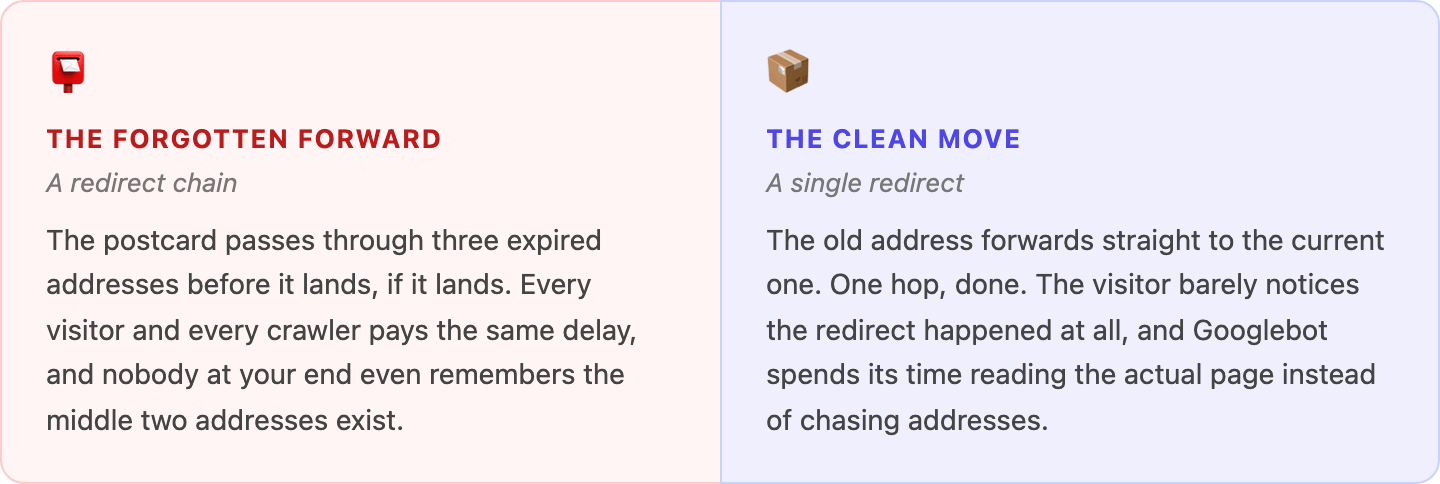
differences redirect chains example

Where redirect chains usually come from

Nobody sits down and deliberately builds a three-hop chain. They accumulate, one honest decision at a time. A site moves from HTTP to HTTPS. A year later it drops the www. A year after that, a category page gets renamed during a bigger site migration. Each change was a correct redirect on its own. Stacked together, unnoticed, they become exactly the kind of forwarding order that never gets cancelled.

The other common source is plugins and page builders that quietly add their own redirect the moment a URL or slug changes, on top of whatever redirect already existed from the last time. Nobody wrote the chain on purpose. The tooling just kept adding forwards without ever checking whether an old one was already pointing somewhere else.

The habit that prevents most of this

Whenever you retire a URL, take thirty seconds to check whether it is already redirecting from somewhere else. If it is, update that older redirect to point straight at the new destination instead of adding another link to the chain. It is a small habit, and it is the single best way to stop chains from forming in the first place.

How to find redirect chains with a redirect chain checker

You cannot fix what you cannot see, and chains hide well because each individual hop looks completely normal on its own. A good redirect chain checker is the only reliable way to catch them, and which one you reach for depends on whether you are auditing a whole site or just tracing a single stubborn URL.

Here is how to find redirect chains in Screaming Frog, the redirect chain checker most technical SEOs reach for first. Crawl your site (or run a URL list in list mode), then go to Reports > Redirects > Redirect Chains. It maps out every chain it finds, how many hops each one takes, and flags it separately if the chain turns out to be a loop instead. One setting trips people up here: if a chain leaves your starting folder, Screaming Frog will not follow it unless Crawl Outside of Start Folder and Always Follow Redirects are both switched on first, under Configuration.
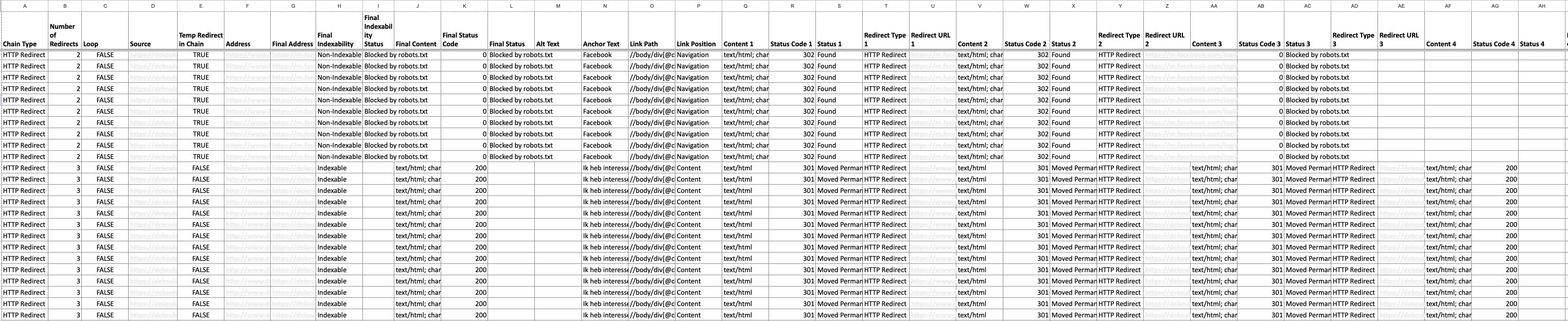
redirect chain metrics

Moz does not sell a separate, standalone redirect chain checker. What it has is a "Redirect Chain" issue inside Moz Pro's Site Crawl, using the same two-hops-or-more rule described earlier. If you searched for a moz redirect chain tool expecting a free public checker, this is the actual feature: run a Site Crawl and look under its issues for anything flagged as a redirect chain.

For a quick one-off check without a full crawl, a lightweight redirect chain checker like a bulk HTTP status tool or a browser extension that shows the raw redirect path will do the job on a single URL in seconds. Save the full site crawl for a proper audit, and keep a quick redirect chain checker bookmarked for the day someone forwards you a single suspicious link.

Picking the right redirect chain checker for the job

Use Screaming Frog when you need every chain on the whole site in one export. Use Moz Pro's Site Crawl if you already run it regularly and want chains flagged alongside your other technical issues. Use a bulk or browser-based redirect chain checker when someone hands you one link and you need the answer in the next thirty seconds, not after a full crawl.

Apply this yourself

Run your redirect chain checker of choice, Screaming Frog with both settings above enabled, or a Moz Pro Site Crawl, export the redirect chain report, and sort it by number of hops. Start fixing from the top of that list. Those are the chains costing the most time per visit.

How to fix redirect chains and loops, step by step

Fixing a chain is mostly about shortening the route, not ripping anything out. Work through the steps below yourself, or hand the technical cleanup to a dedicated SEO team and check back once the chains are gone.

  1. Follow the chain to its real end. Trace every hop until you reach the URL that actually returns a working page. That final URL, not any of the stops in between, is what everything else should point to.

  2. Repoint the first redirect directly to that final URL. This is how to remove redirect chain problems for good: update the origin URL's redirect so it skips every middle hop and lands on the destination in one move.

  3. Update your own internal links, canonicals and sitemap. Anywhere your site links to the old, intermediate URL, point it at the final URL instead. A clean internal linking structure should never send a visitor through a redirect it does not need to.

  4. Treat loops as a separate fix. If two URLs redirect to each other, shortening the chain will not help, because there is no real page at the end. Decide which one should be the canonical, working page, and make sure it actually returns content instead of another redirect.

  5. Leave the original entry point live. Old backlinks and bookmarks may still hit that first URL, so keep it redirecting. You are shortening what happens after it, not deleting it.

  6. Re-crawl to confirm it is actually gone. Run Screaming Frog or Moz's Site Crawl again on the same URL. A fixed chain should now show a single hop, with the old middle addresses no longer appearing anywhere in the report.

Apply this yourself

Take the five highest-traffic URLs from your Redirect Chains export and fix only those this week. Re-crawl just those five to confirm each one now resolves in a single hop before you move on to the rest of the list.

Nobody ever gets a compliment for a forwarding order that works. Nobody notices the postcard that arrived the next day, because that is exactly what was supposed to happen. The only forwards anyone ever talks about are the ones that got lost, or the ones that took two weeks to show up because they bounced through three addresses nobody remembered to cancel.

That is the whole case for cleaning up your redirect chains. It will not hand you a ranking boost overnight, and it was never going to. What it does is make sure every visitor, and every crawler, gets to the right door in one move instead of three. Cancel the old forwards. Let the mail go straight through.

Anne

LinkedIn author:

Meet Wolfy

Triple your productivity with Wolfy, the dedicated Google Ads agent.

Read more

Contents

No headings found

Redirect chains mailman

Every time your site moves, someone sets up a forward. Redirect chains happen when three or four of those old forwards are still stacked on top of each other. Here is what that actually costs you, and how to clear it out.

You moved three times in five years. Every time, you stood at the counter and filled in the same form: forward my mail to the new address. Nobody ever went back to cancel the old forwards.

So now a single postcard addressed to you does not travel from the sender straight to your door. It lands at address one, gets redirected to address two, which forwards it again to address three, before it finally reaches you, if it reaches you at all. Every stop adds a day. Every day is a chance somebody just gives up and sends it back. That stack of forgotten forwarding orders is exactly what a redirect chain is doing to your website right now.

What is a redirect chain?

A redirect chain is what happens when a URL does not redirect straight to its destination, but passes through one or more extra stops on the way there. URL A redirects to URL B, which redirects to URL C, and only C actually loads a page. That is two hops instead of one, and it is enough to count. Moz's own crawler is explicit about the threshold: a page that redirects once is fine, but a page that redirects twice or more before landing gets flagged as a redirect chain.

It helps to separate this from its uglier cousin, the redirect loop. A chain is a forwarding order that is slow but still gets there eventually: A to B to C, and C is a real page. A loop is a forwarding order that never arrives: A sends you to B, and B sends you straight back to A, forever. A chain wastes time. A loop wastes everyone's time and never delivers the mail at all.

Apply this yourself

Pick one URL on your site that you know has moved before, maybe an old campaign link or a page that survived a rebrand. Paste it into your browser with developer tools open on the Network tab, and count the 301 or 302 responses before the page actually loads. Anything past one hop is a redirect chain sitting on a page real visitors still click.

Does a redirect chain actually hurt your SEO?

Redirect chain SEO comes down to three questions: how many hops, how much slower, and whether Googlebot ever reaches the end. The honest answer is less alarming than the old SEO folklore claims, but not zero. For years, blog posts (including some of Moz's own older ones) repeated the idea that you lose a fixed slice of "link juice," often quoted as around 10%, every time a link passes through a redirect. Google's current guidance does not support that number. Its own developer documentation states plainly that 301 and other permanent redirects don't cause a loss in PageRank. If your only worry about a redirect chain is that it is quietly draining ranking power, you can mostly let that one go.

What a redirect chain does cost you is speed and patience, both yours and Googlebot's. Every extra hop is another full round trip before the real page loads, which is measurably slower for anyone who clicks that link. And there is a limit to how many stops any postal service will run before giving up. Google's own documentation says Googlebot can follow up to 10 redirect hops, but recommends staying well under that, ideally three and fewer than five. John Mueller has said the same thing more bluntly: keep it under five hops for any URL that gets crawled often, because past that point you are just adding delay for no benefit.

There is a second, quieter cost too. Redirect chains are usually a symptom of a bigger mess: URLs from a migration that were never fully cleaned up, still tangled with a second or third change made after the fact. Untangling the chain is often the moment you notice the real problem underneath it.

Apply this yourself

Open Google's site-move documentation and note the number: fewer than five hops, ten as the hard ceiling. Then check your highest-traffic legacy URLs against that number. A page with two or three hops is worth fixing when you have time. A page with six or more is worth fixing today.

One clean move versus a stack of old forwards

Side by side, the difference is obvious. One of these is a forwarding order done properly. The other is what happens when nobody ever goes back to tidy up.

differences redirect chains example

Where redirect chains usually come from

Nobody sits down and deliberately builds a three-hop chain. They accumulate, one honest decision at a time. A site moves from HTTP to HTTPS. A year later it drops the www. A year after that, a category page gets renamed during a bigger site migration. Each change was a correct redirect on its own. Stacked together, unnoticed, they become exactly the kind of forwarding order that never gets cancelled.

The other common source is plugins and page builders that quietly add their own redirect the moment a URL or slug changes, on top of whatever redirect already existed from the last time. Nobody wrote the chain on purpose. The tooling just kept adding forwards without ever checking whether an old one was already pointing somewhere else.

The habit that prevents most of this

Whenever you retire a URL, take thirty seconds to check whether it is already redirecting from somewhere else. If it is, update that older redirect to point straight at the new destination instead of adding another link to the chain. It is a small habit, and it is the single best way to stop chains from forming in the first place.

How to find redirect chains with a redirect chain checker

You cannot fix what you cannot see, and chains hide well because each individual hop looks completely normal on its own. A good redirect chain checker is the only reliable way to catch them, and which one you reach for depends on whether you are auditing a whole site or just tracing a single stubborn URL.

Here is how to find redirect chains in Screaming Frog, the redirect chain checker most technical SEOs reach for first. Crawl your site (or run a URL list in list mode), then go to Reports > Redirects > Redirect Chains. It maps out every chain it finds, how many hops each one takes, and flags it separately if the chain turns out to be a loop instead. One setting trips people up here: if a chain leaves your starting folder, Screaming Frog will not follow it unless Crawl Outside of Start Folder and Always Follow Redirects are both switched on first, under Configuration.

redirect chain metrics

Moz does not sell a separate, standalone redirect chain checker. What it has is a "Redirect Chain" issue inside Moz Pro's Site Crawl, using the same two-hops-or-more rule described earlier. If you searched for a moz redirect chain tool expecting a free public checker, this is the actual feature: run a Site Crawl and look under its issues for anything flagged as a redirect chain.

For a quick one-off check without a full crawl, a lightweight redirect chain checker like a bulk HTTP status tool or a browser extension that shows the raw redirect path will do the job on a single URL in seconds. Save the full site crawl for a proper audit, and keep a quick redirect chain checker bookmarked for the day someone forwards you a single suspicious link.

Picking the right redirect chain checker for the job

Use Screaming Frog when you need every chain on the whole site in one export. Use Moz Pro's Site Crawl if you already run it regularly and want chains flagged alongside your other technical issues. Use a bulk or browser-based redirect chain checker when someone hands you one link and you need the answer in the next thirty seconds, not after a full crawl.

Apply this yourself

Run your redirect chain checker of choice, Screaming Frog with both settings above enabled, or a Moz Pro Site Crawl, export the redirect chain report, and sort it by number of hops. Start fixing from the top of that list. Those are the chains costing the most time per visit.

How to fix redirect chains and loops, step by step

Fixing a chain is mostly about shortening the route, not ripping anything out. Work through the steps below yourself, or hand the technical cleanup to a dedicated SEO team and check back once the chains are gone.

  1. Follow the chain to its real end. Trace every hop until you reach the URL that actually returns a working page. That final URL, not any of the stops in between, is what everything else should point to.

  2. Repoint the first redirect directly to that final URL. This is how to remove redirect chain problems for good: update the origin URL's redirect so it skips every middle hop and lands on the destination in one move.

  3. Update your own internal links, canonicals and sitemap. Anywhere your site links to the old, intermediate URL, point it at the final URL instead. A clean internal linking structure should never send a visitor through a redirect it does not need to.

  4. Treat loops as a separate fix. If two URLs redirect to each other, shortening the chain will not help, because there is no real page at the end. Decide which one should be the canonical, working page, and make sure it actually returns content instead of another redirect.

  5. Leave the original entry point live. Old backlinks and bookmarks may still hit that first URL, so keep it redirecting. You are shortening what happens after it, not deleting it.

  6. Re-crawl to confirm it is actually gone. Run Screaming Frog or Moz's Site Crawl again on the same URL. A fixed chain should now show a single hop, with the old middle addresses no longer appearing anywhere in the report.

Apply this yourself

Take the five highest-traffic URLs from your Redirect Chains export and fix only those this week. Re-crawl just those five to confirm each one now resolves in a single hop before you move on to the rest of the list.

Nobody ever gets a compliment for a forwarding order that works. Nobody notices the postcard that arrived the next day, because that is exactly what was supposed to happen. The only forwards anyone ever talks about are the ones that got lost, or the ones that took two weeks to show up because they bounced through three addresses nobody remembered to cancel.

That is the whole case for cleaning up your redirect chains. It will not hand you a ranking boost overnight, and it was never going to. What it does is make sure every visitor, and every crawler, gets to the right door in one move instead of three. Cancel the old forwards. Let the mail go straight through.

Anne

LinkedIn author:

Meet Wolfy

Triple your productivity with Wolfy, the dedicated Google Ads agent.

Read more

Frequently asked questions

Frequently asked questions

What are redirect chains?

What is an example of a redirect chain?

Is redirect bad for SEO?

What is the difference between 301 and 302 redirects?

How to fix redirect chains and loops?

5 ways to dominate in AI search in 2026

Read the 5 ways to dominate in AI search in 2026

The exact playbook how we help businesses rank and advertise in the AI era is now available.

Check your email