Search Engine Marketing (SEO)

A complete guide to SEO migrations

Like birds crossing continents, websites migrate too. They move from one domain to another, from one platform to the next, or from an old structure into something new.
However, a successful migration is never just about reaching the destination. It is about knowing the route before you move. Every important URL needs a clear path. Every redirect needs to be planned. Every signal needs to help search engines understand what changed, what stayed, and where everything now lives.
Because when the route is unclear, rankings can drop, traffic can disappear, and a migration quickly becomes a recovery project.
At Flowboost, we have prepared this guide to walk you through the preparation needed to migrate your website without losing the visibility you have built.
SEO Migration Fundamentals
What is a website migration?
A website migration refers to any significant change to a website that can affect its structure, platform, content, or URL. These changes are often implemented to improve user experience, update branding, enhance functionality, or align with evolving business goals. While migrations can deliver long-term benefits, they can also disrupt a site’s search engine optimization (SEO) if not handled carefully.
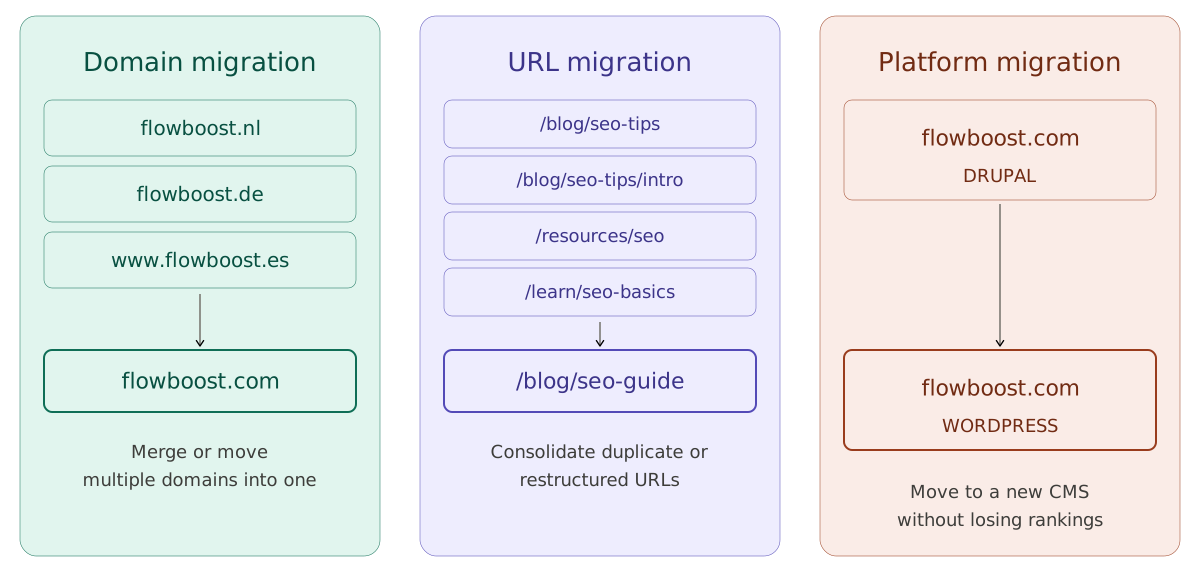
Types of website migrations include:
Domain changes: Switching to a new domain or moving from HTTP to HTTPS.
Platform migrations: Transitioning to a different content management system (CMS).
Structural updates: Altering the site’s URL structure or navigation.
Content overhauls: Revamping or consolidating existing pages and content.
Design changes: Updating the site’s visual layout and functionality.
Each type of migration presents unique SEO challenges, such as broken links, duplicate content, or loss of keyword rankings. This is why having a comprehensive SEO-focused migration plan is critical to avoid setbacks and ensure a successful transition.
The importance of SEO in website migrations
SEO is a critical factor in website migration because it directly affects your site's visibility and organic traffic. Search engines and LLMs rely on various signals (like content, URLs, and backlinks) to rank your site. A poorly executed migration can disrupt these signals, leading to lost rankings and traffic.
Immediately after a migration, a drop in rankings is likely, as pages may need to be re-indexed and re-crawled first. This is completely normal, and recovery may take some time. It’s essential to communicate this clearly to the client to prevent misunderstandings and potential concerns.
By prioritizing SEO during your migration, you can:
Preserve rankings: Maintain your existing keyword rankings and search visibility.
Avoid penalties: Prevent technical issues, such as duplicate content or broken links, that could trigger penalties from search engines.
Retain traffic: Ensure a smooth user experience and avoid a drop in organic traffic.
Ensure a proper UX: redirecting users to the correct URL and preventing 404 or soft 404 errors.
To achieve these goals, you’ll need a detailed plan that addresses each stage of the migration process.
Post-Migration Benefits
Some long-term post-migration benefits include:
✅ Sustained SEO improvements: A better-optimized crawl budget and the resolution of technical issues lead to lasting gains in search rankings.
✅ Enhanced user experience (UX) over time: Faster load speeds, improved navigation, and a well-structured site contribute to long-term user satisfaction.
✅ Greater organic visibility in the long run: Reduced duplicate content and SEO-friendly URLs help maintain and grow search presence over time.
✅ Consistently higher conversion rates: A more intuitive user journey and improved accessibility to key pages continue to drive better engagement and conversions.
✅ Future-proofed technology stack: Migrating to modern, scalable platforms ensures long-term performance and adaptability.
✅ Sustained online authority: Retaining backlinks and domain authority helps preserve and strengthen SEO value over time.
Common mistakes during a migration
Being aware of the most frequent mistakes helps ensure a smoother migration and protects your site's organic performance.
Forgetting to update internal links: Bulk update internal links to reflect the new URL structure and avoid broken pathways.
Overlooking backlinks: Identify high-value backlinks and reach out to webmasters to update them to the new URLs (if possible).
Creating redirect chains and loops: Implement clean 301 redirects directly to the final destination and regularly audit for chains or loops using Screaming Frog.
Ignoring canonical tags: Update canonical tags to match the new URLs to avoid duplicate content issues.
Skipping mobile usability testing: Run Google’s Mobile-Friendly Test to ensure the site remains optimized for mobile users.
Failing to submit updated sitemaps and robots.txt: Submit the new XML sitemap in Google Search Console and double-check the robots.txt for accurate indexing instructions.
Not monitoring post-migration performance: Set up KPIs (traffic, rankings, indexation status) and monitor them daily for the first few weeks post-launch.
Pre-migration steps
When carrying out an SEO migration, there are a number of steps that are not merely recommended, but essential.
1 - Building a strong foundation
A website migration is a complex and delicate process where significant mistakes can easily occur. For this reason, careful organization is crucial from the outset. Additionally, it is highly recommended to maintain a comprehensive record of all communication with the client, particularly regarding changes to redirects, to ensure transparency and avoid misunderstandings.
In some cases, we may also be responsible for creating the URL architecture for the new website. Ideally, this should be based on a prior keyword research study to optimize search visibility. However, this may not always be feasible due to budget constraints or client requirements. If we are not tasked with this responsibility, it is essential to verify that the provided URLs are accurate and reflect what will ultimately be implemented on the new site.
Any discrepancies, such as a missing slash or the inclusion of "http" instead of "https" in the redirect map, can result in incorrect redirections, leading to broken links or URLs that do not exist. This can ultimately compromise the entire migration process.
2 - Request information and access to essential tools and platforms
Ideally, SEO specialists should be responsible for managing and planning the migration, while a web developer handles the implementation of the defined redirects. However, this is not always possible, and in some cases, the implementation might have to be taken care of by SEO specialists as well.
For this, the following accesses are required:
Content management system (CMS): Full access to the backend to manage and migrate content.
Web hosting or server access: Credentials for FTP, cPanel, or any hosting platform to handle file transfers.
Analytics tools: Permissions for platforms like Google Analytics and Google Search Console.
DNS settings: Access to your domain registrar for making necessary DNS updates.
Third-party plugins or services: Any tools used for SEO, caching, or other functionalities that need to be migrated or reconfigured.
3 - Audit your current website
If possible, before making any changes, perform a full audit of your current website to identify areas that need to be preserved or improved. Key elements to evaluate include:
Top-performing pages: Use tools like Google Analytics to pinpoint pages that drive the most traffic and conversions.
Backlink profile: Identify pages with high-quality backlinks using tools like Ahrefs, SEMrush, or Majestic.
Current URL structure: Map your existing URLs to ensure smooth redirection later.
Active redirects: that might need to be removed or updated.
Content: if possible, create backups of the current content.
Core Web Vitals: make sure the page speed is not slower after the migration.
This audit will serve as a blueprint for your migration, helping you prioritize pages and avoid losing valuable content or link equity.
Export and store your baseline data:
Before making any changes, export and save the current performance data so you have a reference point to compare against after the migration. This is especially critical in domain migrations: Search Console properties are tied to a specific domain, so the old property stops collecting data once you move, and a new property starts from zero. If you haven't exported beforehand, that historical baseline is effectively lost. Make sure to save:
GSC performance data (clicks, impressions, positions by query and page) — export it or pipe it into Looker Studio / BigQuery for a fuller record.
GA4 data (sessions, users, conversions by landing page) — and confirm whether your property and data stream will carry over or need reconfiguring for the new domain.
Rankings for your priority keywords from your rank-tracking tool.
Without this baseline, you won't be able to tell whether the migration succeeded or quietly lost traffic.
4 - Keyword Research + Mapping
Ideally, a website migration should be based on a prior keyword research study to determine the best website architecture for the new website. It is always easier to build a well-structured site from the start, rather than modifying it and redirecting content later.
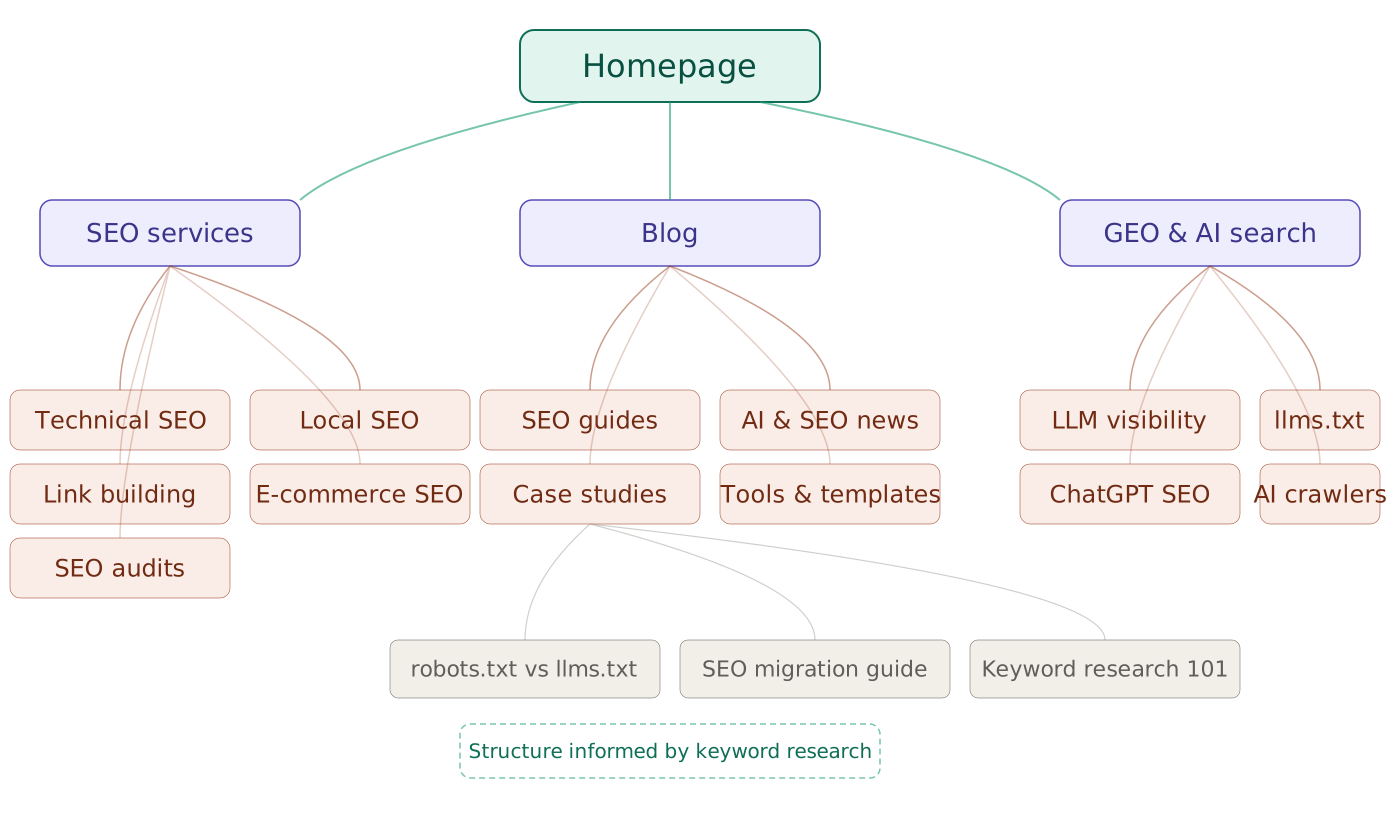
However, depending on the budget and the client's requirements, this is not always possible. Still, it is always advisable to guide the client and explain the best approach. A keyword research study helps identify the most valuable terms for the client and determine which category and subcategory URLs should be created. This facilitates a well-structured internal linking strategy and optimizes the crawl budget.
SEO migration plan
Our SEO migration plan will include three key documents or stages:
1 - Creating a test set
Once we have conducted an initial analysis of the current website and identified the most relevant URLs, we need to create a test set.
A test set is simply an overview of all the URLs that must be considered for the migration. To create it, we need to crawl the website and export all discovered URLs. These URLs will then be classified, categorized, and mapped to determine whether they should be redirected and, if so, where they should point.
To export all existing URLs, we will use the following tools:
Screaming Frog
Google Analytics
Google Search Console
Screaming Frog
The first tool to crawl the website and export its URLs is Screaming Frog. It is really important to ensure that the sitemap.xml is included in the crawl and that the Crawl Analysis option is enabled, with special attention to detecting orphan URLs. This helps prevent important pages from being overlooked, especially those that may not be internally linked.
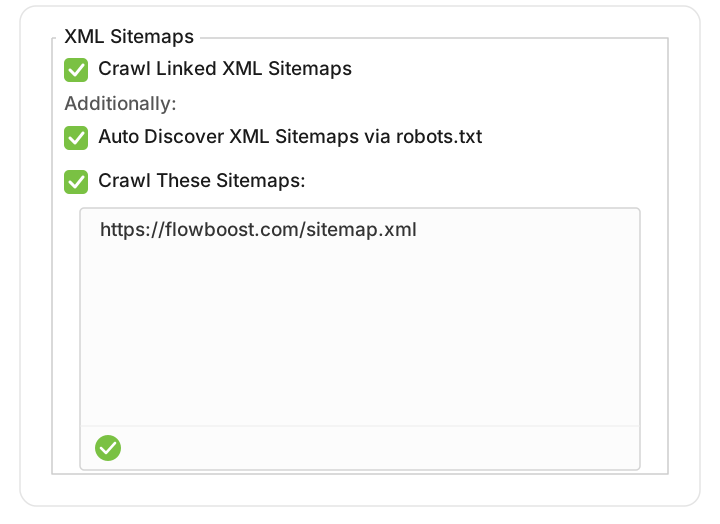
For the migration, generally only HTML URLs will be considered, as those related to CSS and JavaScript rarely provide SEO value or generate organic traffic. However, if there are critical resource URLs that can be logically redirected, it may be worth considering them.
Since Screaming Frog is an independent, third-party crawler, it only discovers URLs that are internally linked or included in the sitemap. To widen the net as much as possible, it is essential to connect the Google Search Console and Google Analytics 4 APIs before running the crawl. Once Crawl Analysis is enabled, Screaming Frog cross-references the crawled URLs against the data returned by these APIs and the sitemap, flagging any orphan URLs that exist in those sources but were never reached through internal links. As an added benefit, this also pulls performance data for each URL directly into the crawl, which is invaluable when deciding which pages to prioritise.
One caveat worth keeping in mind: these APIs only return URLs that have associated data (pages with impressions in Search Console or traffic in Analytics). Pages that exist but have never received either will not appear. For that reason, the API connection gets you most of the way to a complete URL list, but a final manual review remains the safety net, which is covered in the next sections.
Google Search Console
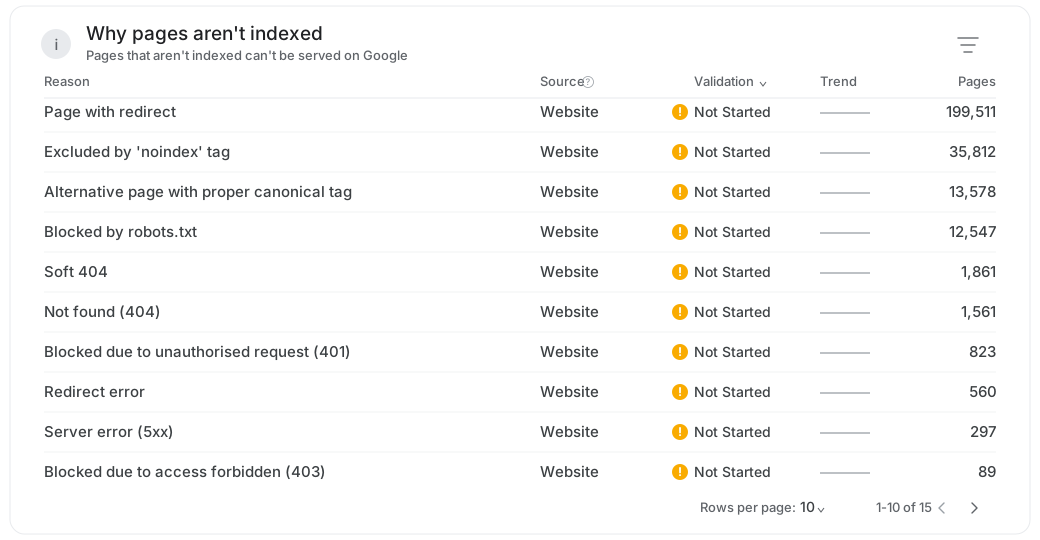
Within the GSC property, navigate to the Pages section. Here you will find a classification of pages divided into Indexed and Not Indexed. This view is particularly valuable during a migration, because it surfaces URLs that Google is aware of regardless of whether they are internally linked, and it explains why certain pages are being left out of the index.
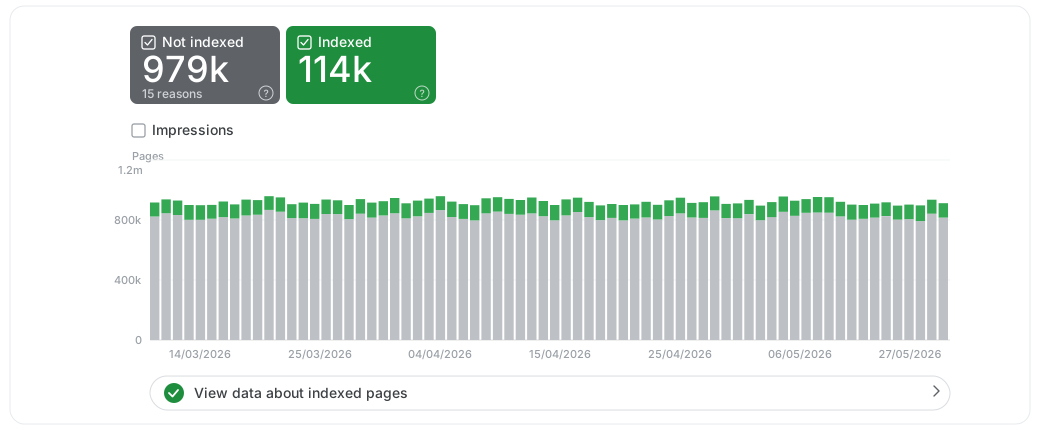
While Indexed URLs can be exported in bulk, Not Indexed URLs require a bit more work: you need to click on each specific reason for non-indexation (for example, "Page with redirect", "Alternative page with proper canonical tag", or "Blocked due to access forbidden (403)") and export them in groups. This grouping by reason is useful in itself, as it tells you how each set of URLs should be handled in the migration: some will need redirects, others are already correctly canonicalised, and others can safely be left behind.
A practical limitation to keep in mind is that GSC's interface caps exports at around 1,000 rows per report. For smaller sites this is rarely an issue, but on larger migrations it quickly becomes a bottleneck. To work around it for performance data, you can connect Search Console to Looker Studio and build a dashboard that lets you work with a fuller dataset (and export it), or query the Search Analytics API directly, which is not bound by the same 1,000-row limit. Bear in mind, however, that these methods are best suited to performance data (clicks, impressions, positions); the indexation breakdown by reason still tends to require the manual, group-by-group export described above.
It is worth remembering that this indexation report is distinct from the performance data pulled through the API in the previous step. The API brings clicks, impressions, and positions; this report tells you the actual indexation status and the reason behind it. Reviewing both is what gives you a complete picture before building the redirect map.
Google Analytics 4
As mentioned earlier, connecting the GA4 API directly to Screaming Frog already pulls traffic and engagement data into the crawl, associating each URL with its real usage metrics. For most migrations, this covers the bulk of what GA4 has to offer.
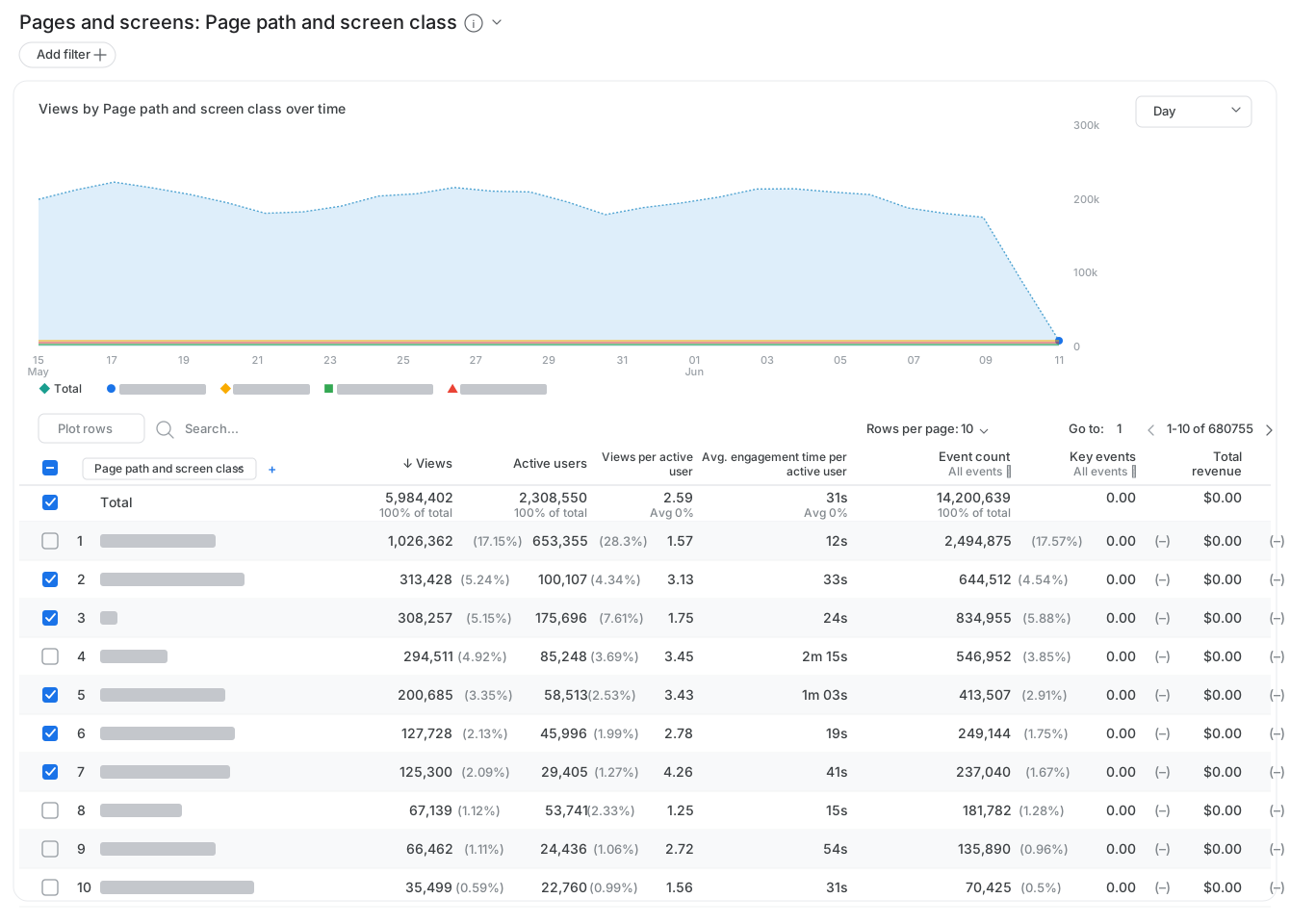
That said, it can still be worth opening the GA4 property directly as a verification step. Navigate to Reports and, within the Engagement section, click on Pages and Screens. This report only displays URLs that have received traffic, so it will not surface pages that have never been visited; but a quick manual review helps confirm that no high-traffic URL has slipped through, especially if it was not internally linked or present in the sitemap.
Test set overview
The distribution of the test set will be as follows:
Column A: This will include all the URLs we have obtained from the exports of GA4, GSC, and SF.
Column B: This will include the status code provided by SF for each of these URLs. This is very important, especially when identifying active redirects (301, 302, etc.).
Column C: This will be used to classify the URLs into categories or groups, which will significantly help in determining where they should be redirected and streamline the process.
Column D: This will be used to indicate the version of the URL (whether it contains www or http). While we will later create different redirection maps (one for each version), this helps us organize the URLs and avoid duplicates.
Column E: Action to be taken. Whether a URL needs to be redirected or maintained during the migration.
Column F: The destination for each URL's redirection.
Column G: Comments about the URL, the redirection, communication with the client, etc.
URL Structure
Within the test set document, we can include a tab that shows the new URL structure of the website, after consulting with the developer or designer who will create those URLs.
It is important to ensure that we have the correct URLs, paying special attention to the presence of www, trailing slashes, etc.
It is also helpful to indicate whether the URLs already exist, have been redirected, or need to be created.
Notes & Conclusions
It is very common for clients to have numerous requests and suggestions during a migration (especially when working with big corporates). Therefore, it is recommended that any communication involving changes or requests be recorded in this document in a separate tab.
Exports
Finally, at Flowboost we always advise to include all URL exports from GSC, Screaming Frog, and GA4 in this document.
Although all these URLs will be part of the test set, keeping the original exports can be useful to justify past work, especially when working with large teams where multiple people are involved and might make changes to the website. Sometimes, the URLs tracked a while ago may not match the current ones.
Since a large number of people do not need to see these tabs, and in fact, it might be confusing for them to view so much information, we recommend hiding them though.
2- Do not overlook existing redirects
During the creation of the test set, we will have classified all the URLs and will be ready to create the multiple versions of the redirection map. However, there is one important step we need to take beforehand: ensuring that no active redirects are in place during the implementation that could cause conflicts or redirect chains.
For example, the URL https://labelnone.com/people/daniel had been redirected to https://labelnone.com/leadership. However, this second URL was not going to be part of the new website, as it was going to be redirected to https://flowboost.com/about/. Therefore, it is necessary to remove that redirect and include it in the updated redirection map:
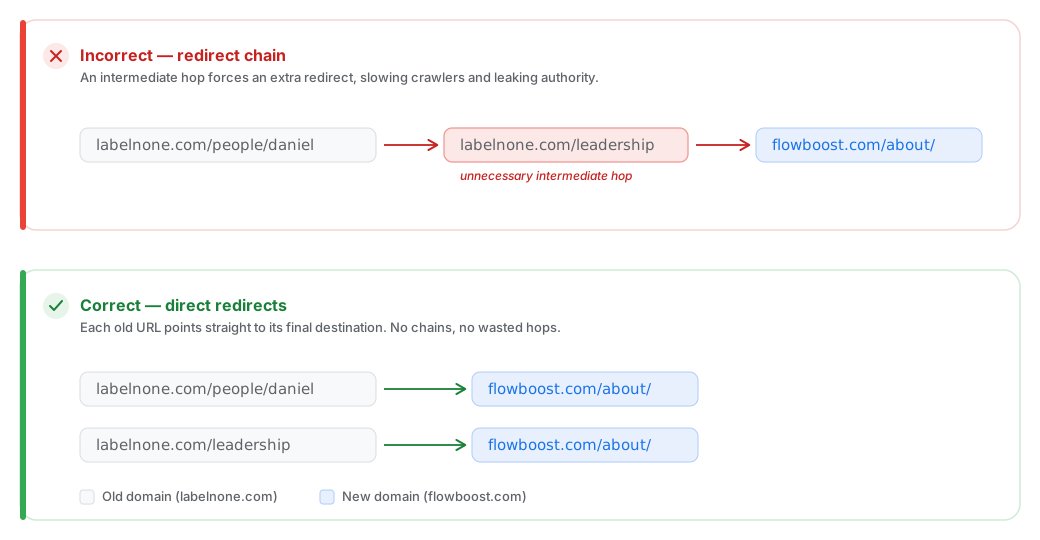
To avoid this, within our migration plan will create a document that includes all active URLs that need to be disabled and updated following the implementation of the new redirection map. These URLs will be added to the final redirect mapping.
3 - Creating a redirect map
Once the test set is built, the URLs classified, and the redirections defined, we can create the redirection map. A single page can be reached through up to 8 different URL variants: every combination of protocol (http/https), www (with or without), and trailing slash (with or without). All of them need to resolve to one canonical version on the new site.
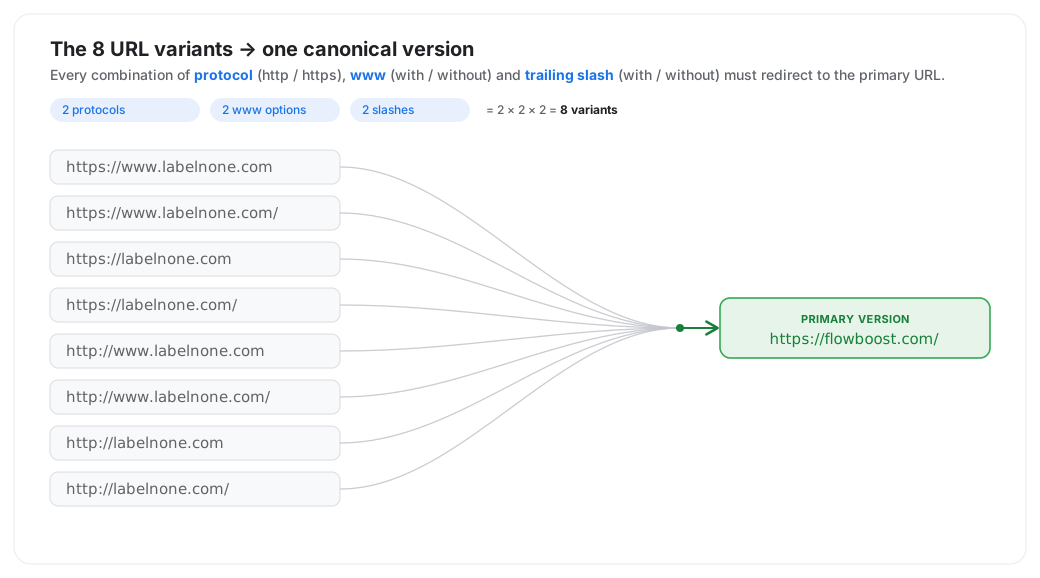
In practice, you don't build 8 separate redirect maps, as that would be unmanageable on large sites. Instead, these variants are handled with redirect rules applied at the server or CDN level: force HTTPS, force non-www (or www), and normalise the trailing slash. A handful of rules collapses all 8 variants into the single primary URL automatically.
Redirect mapping overview
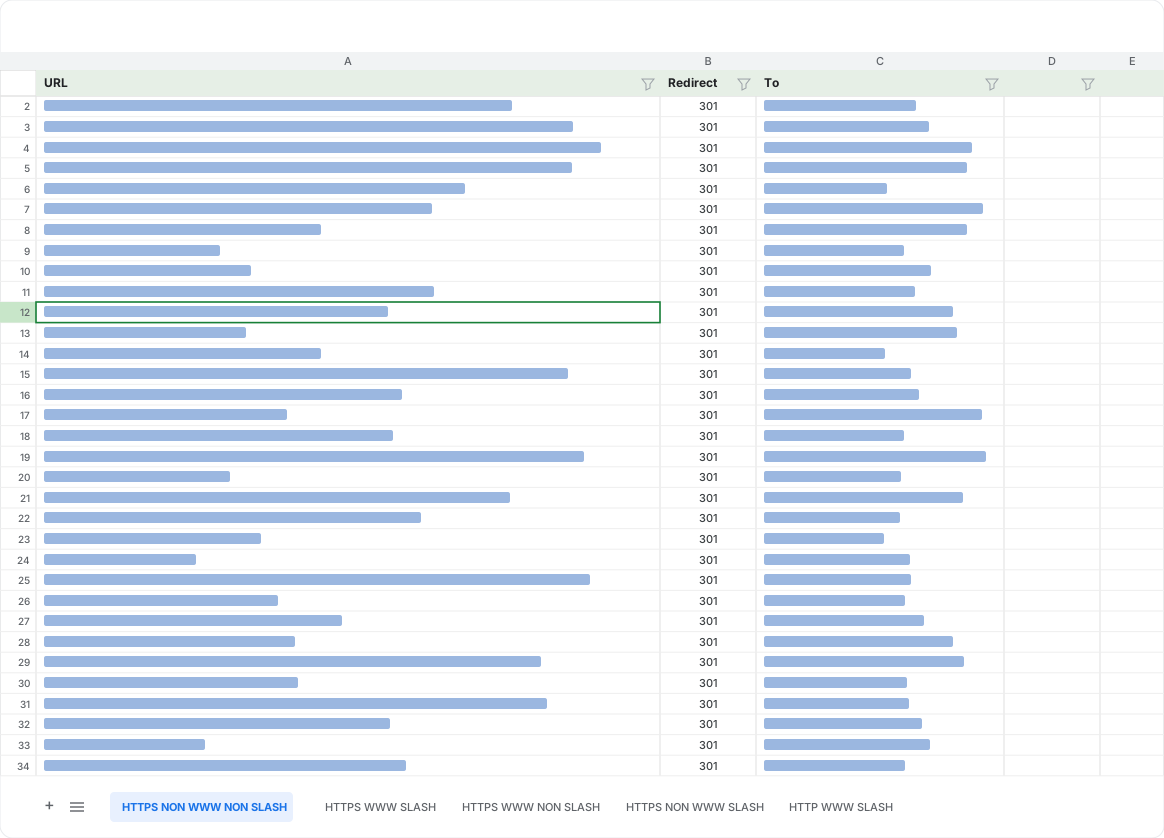
We can create our redirect map using Google Sheets:
Column A contains the version of the URL that needs to be redirected.
Column B contains the type of redirection to be implemented.
Column C contains the destination URLs. They will always be the same for every version of the website.
Different tabs for each version (optional as these should not be implemented manually).
Remember to pay attention to!
Previous redirections and chains
Automating the creation of different versions
Duplicates
Want to skip the manual setup? We've built a free SEO Migration Template that brings together your Screaming Frog crawl, Search Console, and GA4 data into a single prioritised URL map, ready for you to plan redirects with confidence.
Don't redirect until the new site is ready
It's a common misconception that an SEO migration is just a matter of redirecting old URLs to new ones. In reality, the redirects are the final step. They should only be implemented once the new site is fully ready to receive that traffic. Pushing redirects live before the destination is prepared is one of the most common ways migrations lose rankings.
Before redirecting and going live, make sure the new URLs are in place and that the following elements have been correctly migrated:
Content: every page that holds SEO value must exist on the new site, with its content intact. A redirect to a thin or missing page wastes the authority you're trying to preserve. If possible, new content should be SEO optimized.
Canonical tags: each page should point to the correct canonical version on the new domain, so signals aren't split or sent to the wrong URL.
Structured data: schema markup needs to be carried over and updated to reflect the new URLs, so rich results aren't lost in the move.
Hreflang tags: for multilingual or multi-region sites, carry over and update hreflang annotations to point to the new URLs.
Metadata and on-page elements: titles, descriptions, headings, images, and internal links should all be present and pointing to the new structure.
Duplicates: identify and consolidate any duplicate content before launch, rather than carrying the problem into the new site.
Only once the new site is genuinely ready (content live, canonicals correct, structured data in place) should the redirects be implemented and the migration pushed live.
Implementation
Once we have prepared all our documents, we are ready to proceed with the migration, implementing the redirects and content.
Normally, SEO specialists are not responsible for implementing the redirects; this should be handled by web developers. However, this is not always possible, and it is also important for everyone to understand how the implementation works to effectively manage the entire process.
On migration day, attention to detail is critical. Follow these steps to ensure a smooth transition:
Launch your redirects: Ensure all 301 redirects are live and functioning correctly.
Update DNS settings: Point your domain to the new hosting server, if applicable.
Monitor for errors: Use tools like Screaming Frog or Google Search Console to identify and fix any broken links or crawl issues.
Post-migration monitoring: Ensuring long-term success.
Ways of implementing the redirects
Once the redirect map is ready, there are two main ways to implement it, and the right choice depends largely on the type of migration.
Redirects via the CMS. Many platforms like WordPress let you set up redirects through plugins (Rank Math, Redirection, or Yoast SEO). They're easy to manage and don't require server access, which makes them convenient. The catch is that they only work as long as that CMS and plugin stay active. This makes them a reasonable option for structural or URL migrations on smaller sites, where the platform or overall structure isn't changing, but a poor choice for large, domain or platform migration: if you're moving away from the CMS, any redirect stored inside it disappears along with it.
Redirects on the server. Implementing redirects directly on the server (in the .htaccess file on Apache, or in the Nginx configuration) keeps them independent of the CMS. They remain functional as long as the server is active, regardless of platform or plugin changes. This makes them the more robust choice for domain migrations, platform migrations, and larger sites, or any case where the long-term reliability of the redirects is essential. Moreover, Server-level redirects resolve very early (before PHP, the CMS, or any database query loads) so they're marginally faster than plugin-based redirects, which typically require the CMS to boot up and look up the rule before sending the redirect.
As a rule of thumb: if the migration involves changing platforms or domains, implement the redirects at the server level. CMS plugins are best reserved for smaller, lower-risk changes where the platform stays the same.
Staging environment testing
Before pushing the migration live, it's crucial to review the redirects in a staging environment, if one is available. Using staging is important for several reasons: it lets you safely test all changes without affecting the live website, identify technical issues (redirect loops, broken links, and so on) before going live, and validate SEO elements like meta tags, hreflang, canonical tags, and structured data.
One thing to confirm first: make sure the staging environment is blocked from indexing (via noindex, a robots.txt disallow, or password protection) so search engines don't accidentally index your test site and create duplicate content with the live one.
Key elements to test:
URL structure: ensure the new URLs match the planned architecture.
Redirects (301/302): verify that all redirects work as intended and avoid redirect chains.
Internal linking: confirm that internal links point to the correct destinations on the new structure.
Core Web Vitals: test site speed and performance. Keep in mind that in staging you can only measure lab data (e.g. Lighthouse); real-world field data won't exist until the site receives live traffic.
Crawlability: use tools like Screaming Frog or Sitebulb to confirm search engines can crawl the site.
Robots.txt & XML sitemap: ensure these files are correctly configured and updated for the new site (and remember to remove any staging-level blocking before going live).
⚠️ If a staging environment is not available, these elements should be reviewed directly on the live website immediately after going live.
⚠️ Note that testing in a staging environment depends on your setup: staging usually runs on a temporary subdomain or test domain. In a full domain migration, if no such environment exists, some checks can only be performed once the new domain is live.
Post-migration steps
Once the migration is complete and the redirects are live, the work isn't over.
Reporting
It's essential to monitor the site closely and create a report to analyse the migration's impact and results, so you can catch any issues early and confirm that rankings and traffic are transferring as expected.
KPIs to measure migration success
To evaluate whether the migration has been successful, track the following over the weeks after going live:
Organic traffic: compare sessions and users against the pre-migration baseline. A small temporary dip is normal; a sustained drop signals a problem.
Rankings: monitor positions for your priority keywords to confirm they hold or recover after the move.
Indexation: check in Search Console that the new URLs are being indexed and the old ones are dropping out, at the expected pace.
Crawl errors and coverage: watch for spikes in 404s, redirect errors, or "not indexed" pages in Search Console.
Redirect integrity: confirm redirects are still resolving in one hop, with no chains or loops appearing over time.
Core Web Vitals: now that the site has live traffic, monitor field data to ensure performance hasn't regressed.
Conversions / business metrics: ultimately, check that leads, sales, or whatever matters to the business have held steady.
Sitemap and robots.txt
After the migration, we must ensure that the robots.txt file is updated and upload the new sitemap to Google Search Console.
Notifying search engines
Beyond updating the robots.txt and uploading the new sitemap to Search Console, there are a few steps that help search engines process the migration faster:
Keep the old sitemap accessible temporarily. It sounds counterintuitive, but letting Google crawl the old URLs helps it discover the 301s and process the move more quickly.
If this is a domain migration, use the Change of Address tool in Search Console to formally signal the move to Google.
Submit the new sitemap and monitor how quickly the new URLs are picked up.
Don't remove the redirects too soon
Redirects are not a temporary fix. Search engines need time to transfer ranking signals from the old URLs to the new ones, so the 301s should stay in place for at least a year, and ideally longer. Removing them early is one of the most common ways migrations lose the rankings they had successfully transferred.
Where possible, also update internal links to point directly to the new URLs rather than relying on the redirect, and reach out to high-value external sites linking to old URLs so they can update their links at the source.
Our experience with SEO migrations
At Flowboost, SEO migrations are something we manage hands-on. A good example is Treams, a Dutch HR-tech company we guided through a complex international migration and English-language rollout — restructuring their domain and redirects without losing SEO value.
Read the full Treams case study →
Contact us for a consultation and discover how we can help safeguard your SEO performance every step of the way.

Daniel Rojo

Frequently asked questions
Explore other blogs






Rotterdam
Bierstraat 123 C
Valencia Carrer del Prof. Beltrán Báguena 5


Flowboost 2026 ~ All rights reserved.