Tools

The importance of Core Web Vitals in SEO

The importance of Core Web Vitals in SEO

The importance of Core Web Vitals in SEO

By

Anne

8 minutes

Anne

8 minutes

Contents

No headings found

Core Web Votals SEO

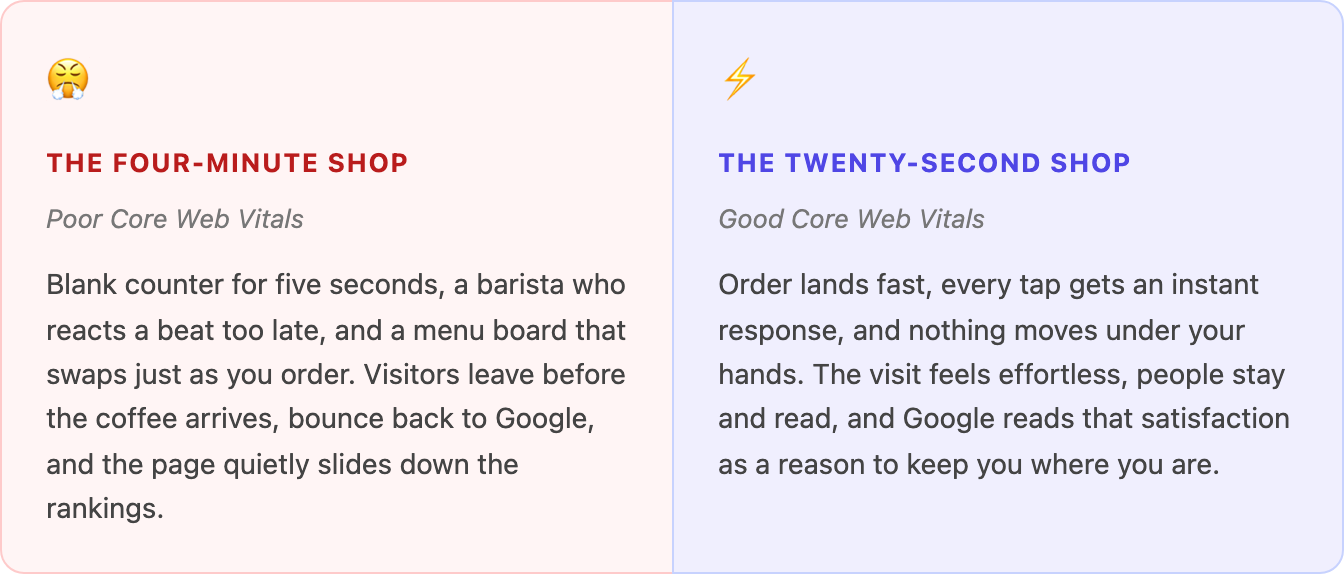
It is 8:02 on a Monday. The queue is out the door. Everyone in it has somewhere to be in ten minutes, and every one of them is silently timing you. The coffee that lands on the counter in twenty seconds gets a customer for life. The one that takes four minutes gets an empty seat and a bad review.

Your website is that coffee shop, and every visitor from Google walks in during the morning rush. They do not care how good your beans are if they are still staring at a blank counter. Core Web Vitals are simply Google's way of standing in the queue with a stopwatch, measuring exactly how good your service feels.

What are Core Web Vitals?

Core Web Vitals are three specific measurements Google uses to score the real-world experience of loading a page. They are part of a broader group of signals Google calls "page experience," and they are built entirely around one question: does this page feel fast, responsive and stable to the actual human using it? That question is the whole of core web vitals SEO in a nutshell.

Think of them as the three things a customer notices about a coffee shop before they notice anything else. How long until my order arrives? When I ask for something, does anyone react? And does the whole place stay put, or do the counter and the menu keep shifting around while I am trying to point at what I want? Get those three right and the coffee almost sells itself. Get them wrong and it does not matter how good the espresso is.

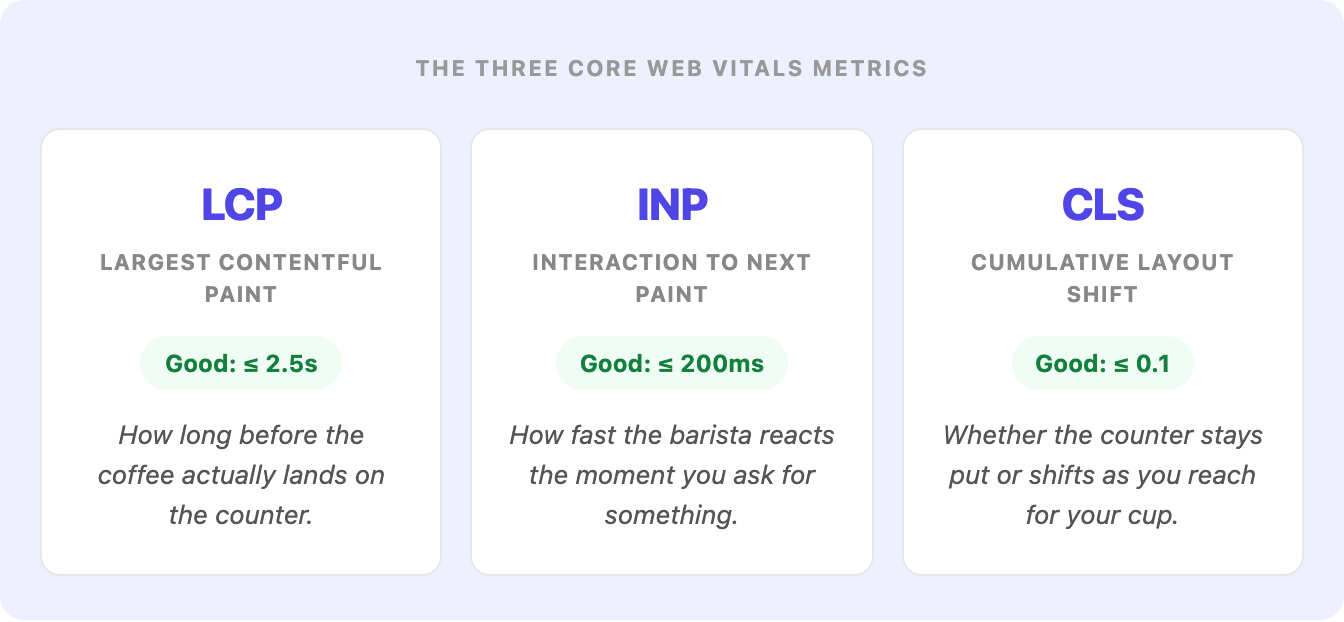
Google measures each of the three with its own metric, and each one has a clear threshold for what counts as "good." Here is the whole menu at a glance.

three core web vitals

One thing worth knowing up front: this list changed recently. Until March 2024 the responsiveness metric was called First Input Delay (FID), which only measured the delay before the first interaction. Google retired it and replaced it with INP, which watches how snappily the page responds across the whole visit. If you read an older core web vitals guide that still talks about FID, it is out of date.

Apply this yourself

Open your homepage on your phone, on mobile data rather than wifi, and actually count. How many seconds until the main image or headline appears? Tap a menu button and notice whether it responds instantly or lags. Watch whether anything jumps down the page as it loads. You have just run a rough manual version of all three Core Web Vitals, exactly as a real visitor experiences them.

Do Core Web Vitals actually affect your SEO rankings?

Yes, but it is worth being precise about how much. Core Web Vitals are a confirmed Google ranking factor, part of the page experience signals the algorithm uses. But they are a tiebreaker, not a trump card. Google has said as much repeatedly: if your page has clearly built more authority on the topic than the competition, a mediocre loading speed will not bury you. What Core Web Vitals do is decide the close calls.

Picture two coffee shops on the same street, selling the same flat white at the same price. One serves it in twenty seconds with a smile. The other takes four minutes and knocks your cup as you reach for it. Over time, guess which one Google's regulars keep choosing. That is the core web vitals seo effect in one sentence: when quality is comparable, the faster and smoother experience wins the position.

There is also a second effect that matters more than the direct ranking bump, and it happens after the click. A slow page pushes people back to the search results before they read a word, and a page that shifts under their thumb makes them tap the wrong thing and leave frustrated. Both send a clear signal that your result did not satisfy the search. Speed is not only about pleasing the algorithm. It protects the hard-won match between the searcher's intent and your page that got them there in the first place.

Also, we can’t overlook the fact that crawling and indexing the web has a real cost for Google: every visit from Googlebot consumes server time, bandwidth, and compute, multiplied across billions of pages. It's no secret that Google doesn't have an infinite crawl budget for every site, and a slow page simply costs more to process than a fast one. We can't say for certain how much this weighs into the decision to reward speed (Google has never spelled out that math) but it wouldn't be far-fetched to think that an algorithm cutting its own infrastructure costs while also improving user experience simply has two good reasons pointing in the same direction.

Apply this yourself

Open Google Search Console and go to the Core Web Vitals report under "Experience." It groups your URLs into Good, Needs improvement, and Poor, using real data from actual Chrome visitors. Start with the "Poor" bucket on mobile. Those are the pages where the morning-rush experience is actively costing you, and they are where a fix will pay back fastest.

LCP, INP and CLS, one service standard at a time

Each of the three vitals measures a different moment in the visit. Understanding what each one actually feels like is the key to knowing what to fix.

  1. LCP (Largest Contentful Paint) is the wait for the coffee. It measures how long it takes for the largest visible element on screen, usually your hero image, headline or main banner, to finish loading. Google wants this under 2.5 seconds. This is the metric most people mean when they talk about page speed, and it is usually the one with the most room to improve. The main culprits are heavy uncompressed images, a slow server, and render-blocking code that makes the browser wait before it can draw anything.

  2. INP (Interaction to Next Paint) is the barista's reaction time. When a visitor taps a button, opens a menu or expands an answer, how long before the page visibly responds? Google wants that under 200 milliseconds. A poor INP feels like waving at a barista who is staring right through you: you tap, and for half a second nothing happens, so you tap again, and now two things fire at once. It is almost always caused by heavy JavaScript hogging the browser's main thread, often from third-party scripts and tracking tags.

  3. CLS (Cumulative Layout Shift) is whether the counter stays still. It measures how much the page unexpectedly moves around while it loads. You have felt bad CLS a hundred times: you go to tap a link, an image or ad suddenly loads above it, the whole page jumps down, and your thumb lands on something you never meant to press. Google wants this score under 0.1. It is the coffee shop equivalent of reaching for your cup just as someone slides the whole counter sideways.

difference in pagespeed websites

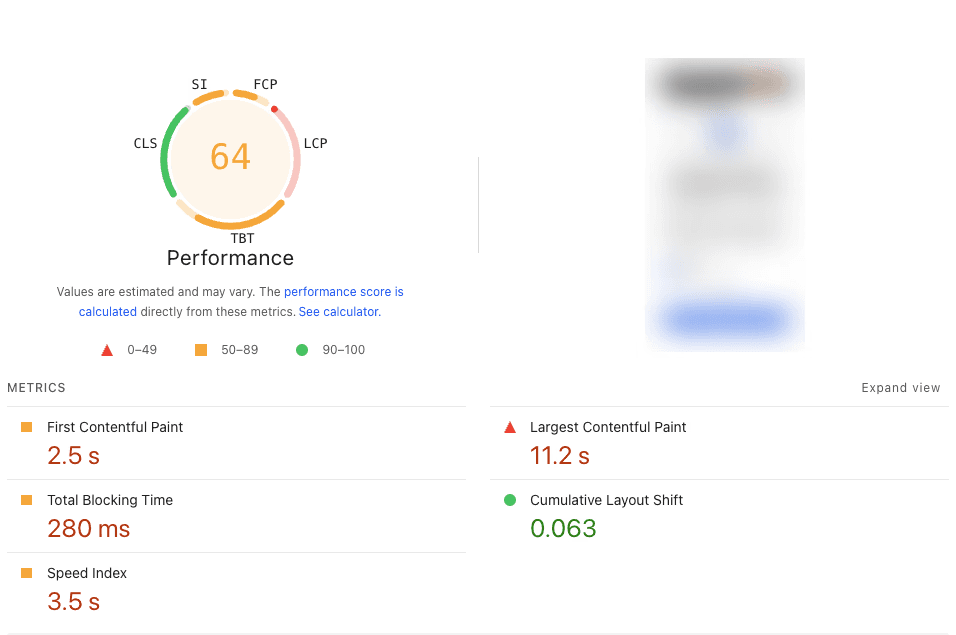
Here is what a four-minute shop actually looks like in a real PageSpeed Insights report. A Performance score of 64 sounds mediocre until you see why: LCP alone is sitting at 11.2 seconds, more than four times the 2.5-second target, while CLS is genuinely good at 0.063. One weak vital can drag the whole score down even when the others are fine.

pagespeed performance

The one that is easiest to forget

Of the three, CLS is the one teams most often ship by accident. It usually comes from images and embeds with no dimensions set, and from ads or banners that load late and shove everything else down. Reserving space for those elements before they load is one of the cheapest, highest-impact fixes in the whole list.

How to test Core Web Vitals

Before you fix anything, you need to know your numbers, and there is one distinction that trips everyone up: lab data versus field data. Lab data is a single simulated test run in a controlled environment. Field data is what real visitors actually experienced over the last 28 days, pulled from the Chrome User Experience Report (CrUX). Google ranks on the field data. The lab test is your practice run; the field data is the health inspector's actual report.

Here is where to run a core web vitals test, from quickest to deepest:

  • 1. PageSpeed Insights. Paste in any URL at pagespeed.web.dev and you get both field and lab data in one screen, plus a prioritised list of what is dragging each metric down. This is the fastest way to test core web vitals for a single page.

  • 2. Google Search Console. The Core Web Vitals report shows every URL on your site grouped as Good, Needs improvement or Poor, on both mobile and desktop, using real field data. This is your site-wide view and the one to check regularly.

  • 3. Chrome DevTools and Lighthouse. Built into Chrome (right-click, Inspect, Lighthouse tab). This is your lab bench for diagnosing a single page in depth and testing a fix before it goes live.

Apply this yourself

Run your three most important pages (usually your homepage, your top service or product page, and your best-performing blog post) through PageSpeed Insights on the Mobile tab. Write down the LCP, INP and CLS field scores for each. That single table is your core web vitals audit, and it tells you exactly which page and which metric to attack first.

Why your report shows more than three numbers

Run PageSpeed Insights yourself and the Performance panel lists five or six metrics, not three: First Contentful Paint, Total Blocking Time, Speed Index, plus LCP and CLS. Only LCP and CLS on that list are actual Core Web Vitals. The rest are lab-only diagnostics Lighthouse uses to calculate its 0-100 Performance score, which is a different thing from the ranking signal Google uses.

You will also notice INP is missing, replaced by Total Blocking Time. INP measures a real person's tap or click, which a single automated lab run cannot fake, so Lighthouse reports TBT instead as its best lab prediction of how INP will behave. If the report also says your site has "No Data" for real-user experience, that just means it does not yet have enough traffic in Google's real-user dataset (CrUX) to report an actual INP score, which is exactly when this lab stand-in appears.

How to improve Core Web Vitals, step by step

Most Core Web Vitals problems come from the same short list of causes, which means the fixes are more repeatable than they look. Work through these in order yourself, or hand the technical side to a dedicated SEO team and skip straight to the results.

  • 1. Compress and right-size your images (fixes LCP). Oversized images are the number one cause of slow loading. Serve modern formats like WebP or AVIF, never load an image larger than it displays, and compress everything. This alone often drags LCP under the 2.5-second line.

  • 2. Preload the hero and speed up your server (fixes LCP). Tell the browser to load your largest element early with a preload hint, put a CDN in front of your site so content is served from close to the visitor, and enable caching. A faster time to first byte lifts every page at once.

  • 3. Trim and defer your JavaScript (fixes INP). Heavy scripts block the main thread and make every tap feel laggy. Defer anything non-essential, remove third-party scripts and tracking tags you do not truly need, and break long tasks into smaller ones so the page can respond between them.

  • 4. Give every image and embed fixed dimensions (fixes CLS). Always set width and height (or a CSS aspect-ratio) on images, videos and iframes. This reserves the space before the file arrives, so nothing jumps when it does.

  • 5. Reserve space for anything that loads late (fixes CLS). Ads, cookie banners, embedded forms and late fonts are the usual shift culprits. Give them a fixed container, and use font-display plus font preloading so text does not reflow when your web font finally loads.

  • 6. Test, ship, and re-measure after 28 days. Confirm the fix in Lighthouse first (lab), then push it live. Because Google ranks on field data averaged over 28 days, the report in Search Console will not update overnight. Make the change, then check back in about a month to see the real-user numbers move.

Apply this yourself

Do not try to fix everything at once. Take the one page and one metric you identified in your audit, apply only the steps above that target that metric, and ship it. A single page moving from "Poor" to "Good" is real progress you can measure, and it teaches you exactly what your particular site needs before you roll the same fixes out everywhere else.

The next vital: is your site ready for AI agents?

Not every order comes from someone standing at your counter anymore. Sometimes a customer sends someone else in to collect it for them: a delivery courier picking up a mobile order, working from a ticket, with no idea where anything is kept. They cannot make eye contact with the barista. They cannot point. They can only work with whatever is labelled clearly enough for a total stranger to find it fast.

That is exactly what an AI agent does on a website. Increasingly, a customer does not browse your site themselves. They ask an assistant like ChatGPT or Claude to do it for them: fill in a form, compare two products, book a slot. Google now measures this too. As of Lighthouse 13.3, PageSpeed Insights added a fifth score that sits quietly next to Performance, Accessibility, Best Practices and SEO, called Agentic Browsing. It is brand new, still marked "under development," and most sites have never heard of it. Here is what a real report looks like today.

example metrics pagespeed

Unlike the other four, Agentic Browsing does not get a score out of 100. It shows a ratio: how many of its checks passed. That is deliberate. The standards for how AI agents should read websites are still being written, so Google is gathering signal rather than issuing a verdict. Right now it checks two things directly, with two more (still marked "not applicable" on most sites) waiting in the wings.

The first check is the accessibility tree: the structured map a browser builds of every button, label and role on your page. It is the exact same map screen readers have relied on for years to describe a page to a blind visitor. AI agents now read that same map to decide what they can click. Think of it as the labels in your stockroom. If the oat milk jug is clearly labelled and the espresso button is clearly the espresso button, a substitute barista on their first shift can still get the order right. If two labels are stuck on one jug, or a button has no label at all, that substitute freezes, or worse, grabs the wrong thing entirely.

Failed check, real example

"Accessibility tree is not well-formed." A site can score a perfectly respectable 90 on general Accessibility and still fail this specific check, because it is a stricter, agent-focused subset. One button with a missing or contradictory label is enough to trip it, even though a human visitor would never notice a thing.

The second check is layout stability, the same Cumulative Layout Shift you already met above. An agent trying to click "confirm booking" gets just as confused by a shifting page as a human thumb does. Waiting in the wings are two more forward-looking checks: WebMCP, a new standard that lets a site register specific named actions (like "add to cart" or "book appointment") an agent can trigger directly, instead of guessing which pixel to click; and an llms.txt file, a simple text file at yoursite.com/llms.txt that works like a laminated index card by the door, a short, readable summary of what your site offers and where to find it, for any visitor (human or otherwise) who has never been inside before.

Should you act on this now?

Treat Agentic Browsing as an early signal, not a fire alarm. The category is still evolving and today it barely touches ranking. But the two checks it already runs, accessibility labelling and layout stability, are things you should be fixing for your human visitors anyway. Getting those right now means you are already halfway ready for whatever this category becomes next.

Apply this yourself

Run your homepage through PageSpeed Insights and scroll past the four familiar scores to find "Agentic Browsing" at the end. If it flags "Accessibility tree is not well-formed," expand the audit for the exact elements involved. Nine times out of ten it is an icon-only button with no label, or a form field whose visible label is not properly connected to its input. Both are quick fixes, and both help every visitor, not just the automated ones.

The best coffee shops understand something that has nothing to do with coffee: the experience is the product. The beans matter, but a customer standing at an empty counter, unheard and unsure whether their order even registered, will never taste them. They will just leave. Core Web Vitals are Google's way of measuring that experience on your behalf, second by second, for every visitor who walks in during the rush.

You do not need a perfect score. You need a page that serves its coffee fast, looks up the moment someone asks, and keeps the counter still while they drink it. That is core web vitals SEO in practice: nail those three and you win the close calls, keep the visitors who arrive, and give Google every reason to keep sending you more. Everything else is just a queue that never gets served.

Anne

LinkedIn author:

Meet Wolfy

Triple your productivity with Wolfy, the dedicated Google Ads agent.

Read more

Contents

No headings found

Core Web Votals SEO

It is 8:02 on a Monday. The queue is out the door. Everyone in it has somewhere to be in ten minutes, and every one of them is silently timing you. The coffee that lands on the counter in twenty seconds gets a customer for life. The one that takes four minutes gets an empty seat and a bad review.

Your website is that coffee shop, and every visitor from Google walks in during the morning rush. They do not care how good your beans are if they are still staring at a blank counter. Core Web Vitals are simply Google's way of standing in the queue with a stopwatch, measuring exactly how good your service feels.

What are Core Web Vitals?

Core Web Vitals are three specific measurements Google uses to score the real-world experience of loading a page. They are part of a broader group of signals Google calls "page experience," and they are built entirely around one question: does this page feel fast, responsive and stable to the actual human using it? That question is the whole of core web vitals SEO in a nutshell.

Think of them as the three things a customer notices about a coffee shop before they notice anything else. How long until my order arrives? When I ask for something, does anyone react? And does the whole place stay put, or do the counter and the menu keep shifting around while I am trying to point at what I want? Get those three right and the coffee almost sells itself. Get them wrong and it does not matter how good the espresso is.

Google measures each of the three with its own metric, and each one has a clear threshold for what counts as "good." Here is the whole menu at a glance.

three core web vitals

One thing worth knowing up front: this list changed recently. Until March 2024 the responsiveness metric was called First Input Delay (FID), which only measured the delay before the first interaction. Google retired it and replaced it with INP, which watches how snappily the page responds across the whole visit. If you read an older core web vitals guide that still talks about FID, it is out of date.

Apply this yourself

Open your homepage on your phone, on mobile data rather than wifi, and actually count. How many seconds until the main image or headline appears? Tap a menu button and notice whether it responds instantly or lags. Watch whether anything jumps down the page as it loads. You have just run a rough manual version of all three Core Web Vitals, exactly as a real visitor experiences them.

Do Core Web Vitals actually affect your SEO rankings?

Yes, but it is worth being precise about how much. Core Web Vitals are a confirmed Google ranking factor, part of the page experience signals the algorithm uses. But they are a tiebreaker, not a trump card. Google has said as much repeatedly: if your page has clearly built more authority on the topic than the competition, a mediocre loading speed will not bury you. What Core Web Vitals do is decide the close calls.

Picture two coffee shops on the same street, selling the same flat white at the same price. One serves it in twenty seconds with a smile. The other takes four minutes and knocks your cup as you reach for it. Over time, guess which one Google's regulars keep choosing. That is the core web vitals seo effect in one sentence: when quality is comparable, the faster and smoother experience wins the position.

There is also a second effect that matters more than the direct ranking bump, and it happens after the click. A slow page pushes people back to the search results before they read a word, and a page that shifts under their thumb makes them tap the wrong thing and leave frustrated. Both send a clear signal that your result did not satisfy the search. Speed is not only about pleasing the algorithm. It protects the hard-won match between the searcher's intent and your page that got them there in the first place.

Also, we can’t overlook the fact that crawling and indexing the web has a real cost for Google: every visit from Googlebot consumes server time, bandwidth, and compute, multiplied across billions of pages. It's no secret that Google doesn't have an infinite crawl budget for every site, and a slow page simply costs more to process than a fast one. We can't say for certain how much this weighs into the decision to reward speed (Google has never spelled out that math) but it wouldn't be far-fetched to think that an algorithm cutting its own infrastructure costs while also improving user experience simply has two good reasons pointing in the same direction.

Apply this yourself

Open Google Search Console and go to the Core Web Vitals report under "Experience." It groups your URLs into Good, Needs improvement, and Poor, using real data from actual Chrome visitors. Start with the "Poor" bucket on mobile. Those are the pages where the morning-rush experience is actively costing you, and they are where a fix will pay back fastest.

LCP, INP and CLS, one service standard at a time

Each of the three vitals measures a different moment in the visit. Understanding what each one actually feels like is the key to knowing what to fix.

  1. LCP (Largest Contentful Paint) is the wait for the coffee. It measures how long it takes for the largest visible element on screen, usually your hero image, headline or main banner, to finish loading. Google wants this under 2.5 seconds. This is the metric most people mean when they talk about page speed, and it is usually the one with the most room to improve. The main culprits are heavy uncompressed images, a slow server, and render-blocking code that makes the browser wait before it can draw anything.

  2. INP (Interaction to Next Paint) is the barista's reaction time. When a visitor taps a button, opens a menu or expands an answer, how long before the page visibly responds? Google wants that under 200 milliseconds. A poor INP feels like waving at a barista who is staring right through you: you tap, and for half a second nothing happens, so you tap again, and now two things fire at once. It is almost always caused by heavy JavaScript hogging the browser's main thread, often from third-party scripts and tracking tags.

  3. CLS (Cumulative Layout Shift) is whether the counter stays still. It measures how much the page unexpectedly moves around while it loads. You have felt bad CLS a hundred times: you go to tap a link, an image or ad suddenly loads above it, the whole page jumps down, and your thumb lands on something you never meant to press. Google wants this score under 0.1. It is the coffee shop equivalent of reaching for your cup just as someone slides the whole counter sideways.

difference in pagespeed websites

Here is what a four-minute shop actually looks like in a real PageSpeed Insights report. A Performance score of 64 sounds mediocre until you see why: LCP alone is sitting at 11.2 seconds, more than four times the 2.5-second target, while CLS is genuinely good at 0.063. One weak vital can drag the whole score down even when the others are fine.

pagespeed performance

The one that is easiest to forget

Of the three, CLS is the one teams most often ship by accident. It usually comes from images and embeds with no dimensions set, and from ads or banners that load late and shove everything else down. Reserving space for those elements before they load is one of the cheapest, highest-impact fixes in the whole list.

How to test Core Web Vitals

Before you fix anything, you need to know your numbers, and there is one distinction that trips everyone up: lab data versus field data. Lab data is a single simulated test run in a controlled environment. Field data is what real visitors actually experienced over the last 28 days, pulled from the Chrome User Experience Report (CrUX). Google ranks on the field data. The lab test is your practice run; the field data is the health inspector's actual report.

Here is where to run a core web vitals test, from quickest to deepest:

  • 1. PageSpeed Insights. Paste in any URL at pagespeed.web.dev and you get both field and lab data in one screen, plus a prioritised list of what is dragging each metric down. This is the fastest way to test core web vitals for a single page.

  • 2. Google Search Console. The Core Web Vitals report shows every URL on your site grouped as Good, Needs improvement or Poor, on both mobile and desktop, using real field data. This is your site-wide view and the one to check regularly.

  • 3. Chrome DevTools and Lighthouse. Built into Chrome (right-click, Inspect, Lighthouse tab). This is your lab bench for diagnosing a single page in depth and testing a fix before it goes live.

Apply this yourself

Run your three most important pages (usually your homepage, your top service or product page, and your best-performing blog post) through PageSpeed Insights on the Mobile tab. Write down the LCP, INP and CLS field scores for each. That single table is your core web vitals audit, and it tells you exactly which page and which metric to attack first.

Why your report shows more than three numbers

Run PageSpeed Insights yourself and the Performance panel lists five or six metrics, not three: First Contentful Paint, Total Blocking Time, Speed Index, plus LCP and CLS. Only LCP and CLS on that list are actual Core Web Vitals. The rest are lab-only diagnostics Lighthouse uses to calculate its 0-100 Performance score, which is a different thing from the ranking signal Google uses.

You will also notice INP is missing, replaced by Total Blocking Time. INP measures a real person's tap or click, which a single automated lab run cannot fake, so Lighthouse reports TBT instead as its best lab prediction of how INP will behave. If the report also says your site has "No Data" for real-user experience, that just means it does not yet have enough traffic in Google's real-user dataset (CrUX) to report an actual INP score, which is exactly when this lab stand-in appears.

How to improve Core Web Vitals, step by step

Most Core Web Vitals problems come from the same short list of causes, which means the fixes are more repeatable than they look. Work through these in order yourself, or hand the technical side to a dedicated SEO team and skip straight to the results.

  • 1. Compress and right-size your images (fixes LCP). Oversized images are the number one cause of slow loading. Serve modern formats like WebP or AVIF, never load an image larger than it displays, and compress everything. This alone often drags LCP under the 2.5-second line.

  • 2. Preload the hero and speed up your server (fixes LCP). Tell the browser to load your largest element early with a preload hint, put a CDN in front of your site so content is served from close to the visitor, and enable caching. A faster time to first byte lifts every page at once.

  • 3. Trim and defer your JavaScript (fixes INP). Heavy scripts block the main thread and make every tap feel laggy. Defer anything non-essential, remove third-party scripts and tracking tags you do not truly need, and break long tasks into smaller ones so the page can respond between them.

  • 4. Give every image and embed fixed dimensions (fixes CLS). Always set width and height (or a CSS aspect-ratio) on images, videos and iframes. This reserves the space before the file arrives, so nothing jumps when it does.

  • 5. Reserve space for anything that loads late (fixes CLS). Ads, cookie banners, embedded forms and late fonts are the usual shift culprits. Give them a fixed container, and use font-display plus font preloading so text does not reflow when your web font finally loads.

  • 6. Test, ship, and re-measure after 28 days. Confirm the fix in Lighthouse first (lab), then push it live. Because Google ranks on field data averaged over 28 days, the report in Search Console will not update overnight. Make the change, then check back in about a month to see the real-user numbers move.

Apply this yourself

Do not try to fix everything at once. Take the one page and one metric you identified in your audit, apply only the steps above that target that metric, and ship it. A single page moving from "Poor" to "Good" is real progress you can measure, and it teaches you exactly what your particular site needs before you roll the same fixes out everywhere else.

The next vital: is your site ready for AI agents?

Not every order comes from someone standing at your counter anymore. Sometimes a customer sends someone else in to collect it for them: a delivery courier picking up a mobile order, working from a ticket, with no idea where anything is kept. They cannot make eye contact with the barista. They cannot point. They can only work with whatever is labelled clearly enough for a total stranger to find it fast.

That is exactly what an AI agent does on a website. Increasingly, a customer does not browse your site themselves. They ask an assistant like ChatGPT or Claude to do it for them: fill in a form, compare two products, book a slot. Google now measures this too. As of Lighthouse 13.3, PageSpeed Insights added a fifth score that sits quietly next to Performance, Accessibility, Best Practices and SEO, called Agentic Browsing. It is brand new, still marked "under development," and most sites have never heard of it. Here is what a real report looks like today.

example metrics pagespeed

Unlike the other four, Agentic Browsing does not get a score out of 100. It shows a ratio: how many of its checks passed. That is deliberate. The standards for how AI agents should read websites are still being written, so Google is gathering signal rather than issuing a verdict. Right now it checks two things directly, with two more (still marked "not applicable" on most sites) waiting in the wings.

The first check is the accessibility tree: the structured map a browser builds of every button, label and role on your page. It is the exact same map screen readers have relied on for years to describe a page to a blind visitor. AI agents now read that same map to decide what they can click. Think of it as the labels in your stockroom. If the oat milk jug is clearly labelled and the espresso button is clearly the espresso button, a substitute barista on their first shift can still get the order right. If two labels are stuck on one jug, or a button has no label at all, that substitute freezes, or worse, grabs the wrong thing entirely.

Failed check, real example

"Accessibility tree is not well-formed." A site can score a perfectly respectable 90 on general Accessibility and still fail this specific check, because it is a stricter, agent-focused subset. One button with a missing or contradictory label is enough to trip it, even though a human visitor would never notice a thing.

The second check is layout stability, the same Cumulative Layout Shift you already met above. An agent trying to click "confirm booking" gets just as confused by a shifting page as a human thumb does. Waiting in the wings are two more forward-looking checks: WebMCP, a new standard that lets a site register specific named actions (like "add to cart" or "book appointment") an agent can trigger directly, instead of guessing which pixel to click; and an llms.txt file, a simple text file at yoursite.com/llms.txt that works like a laminated index card by the door, a short, readable summary of what your site offers and where to find it, for any visitor (human or otherwise) who has never been inside before.

Should you act on this now?

Treat Agentic Browsing as an early signal, not a fire alarm. The category is still evolving and today it barely touches ranking. But the two checks it already runs, accessibility labelling and layout stability, are things you should be fixing for your human visitors anyway. Getting those right now means you are already halfway ready for whatever this category becomes next.

Apply this yourself

Run your homepage through PageSpeed Insights and scroll past the four familiar scores to find "Agentic Browsing" at the end. If it flags "Accessibility tree is not well-formed," expand the audit for the exact elements involved. Nine times out of ten it is an icon-only button with no label, or a form field whose visible label is not properly connected to its input. Both are quick fixes, and both help every visitor, not just the automated ones.

The best coffee shops understand something that has nothing to do with coffee: the experience is the product. The beans matter, but a customer standing at an empty counter, unheard and unsure whether their order even registered, will never taste them. They will just leave. Core Web Vitals are Google's way of measuring that experience on your behalf, second by second, for every visitor who walks in during the rush.

You do not need a perfect score. You need a page that serves its coffee fast, looks up the moment someone asks, and keeps the counter still while they drink it. That is core web vitals SEO in practice: nail those three and you win the close calls, keep the visitors who arrive, and give Google every reason to keep sending you more. Everything else is just a queue that never gets served.
Anne

LinkedIn author:

Meet Wolfy

Triple your productivity with Wolfy, the dedicated Google Ads agent.

Read more

Frequently asked questions

Frequently asked questions

What is core web vital in SEO?

Do Core Web Vitals affect SEO?

What are the 4 pillars of SEO?

What is LCP and CLS?

What is Agentic Browsing in PageSpeed Insights?

5 ways to dominate in AI search in 2026

Read the 5 ways to dominate in AI search in 2026

The exact playbook how we help businesses rank and advertise in the AI era is now available.

Check your email