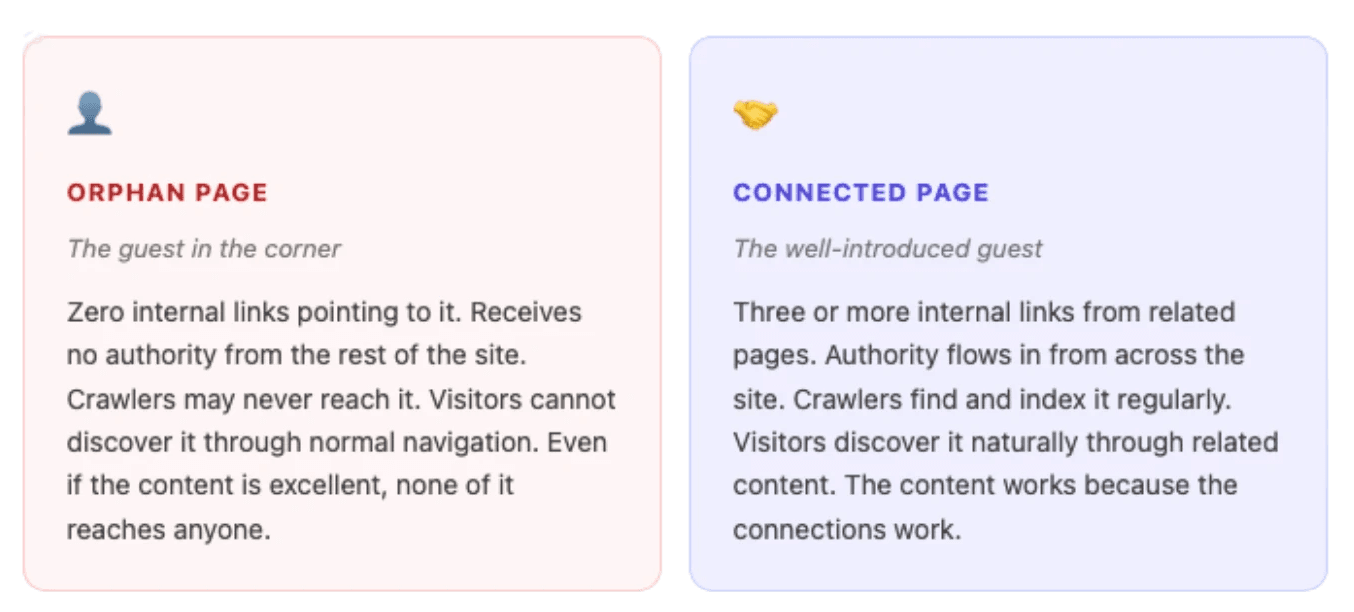
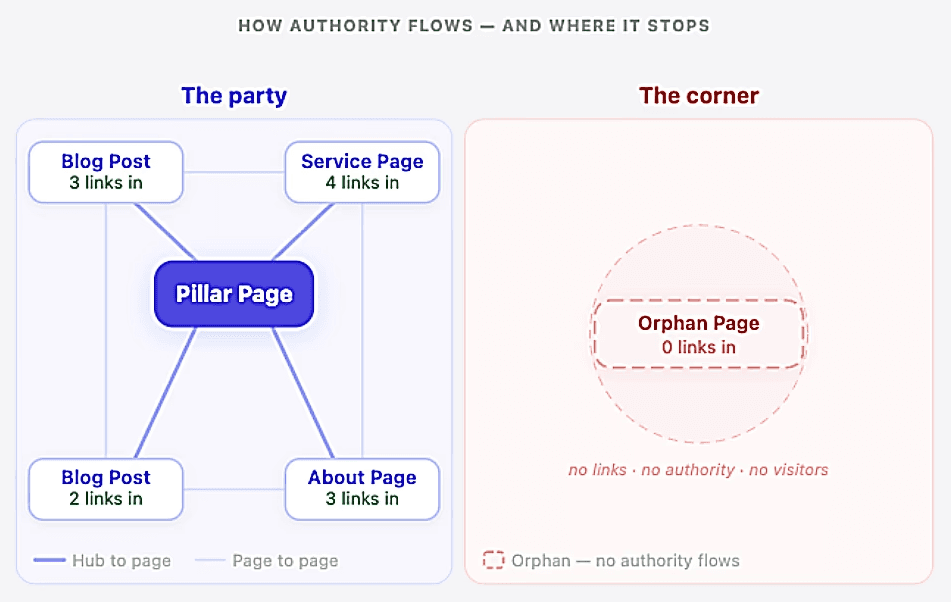
What is an orphan page An orphan page is any page on your website that has zero internal links pointing to it from other pages on your site. It might be indexed by Google. It might even appear in search results occasionally. The defining characteristic is not invisibility, it is isolation. No page on your site introduces it to a visitor or a crawler. No connections have been established.
The party metaphor holds precisely here. The isolated guest did not disappear. They are in the same room as everyone else. The problem is that nobody brought them into the conversation, so as far as the rest of the party is concerned, they might as well not be there.
Orphan pages accumulate on most websites in patterns that are almost invisible during normal operations:
Old blog posts published years ago and never linked from anything new
Campaign landing pages that outlived the campaign they were built for
Product pages added to the catalogue but not to any category or related product page
Service pages left behind after a restructure, when internal links were updated but the old URLs were kept without connections
Thank-you and confirmation pages (which are sometimes intentionally isolated, but rarely by design)
Apply this yourself
Pick three or four of your oldest blog posts or most recently added pages. Then ask: how many other pages on your site currently link to each of them? Check manually by searching “site:yourdomain.com” and looking for references, or use a crawler like Screaming Frog (more on that in section 4). If the answer is zero or one for any of them, you have found your first orphan.
Why isolation quietly destroys SEO authority The party is not just social. There are real consequences to standing alone in the corner.
1. In SEO, authority flows between pages through internal links. When one page links to another, it passes some of its credibility and ranking strength along, a concept known as link equity
“A page nobody links to is a page Google never learns to trust.”
2. There is a second problem: crawl budget. Google sends crawlers to your website regularly to discover and re-index your pages. Those crawlers follow links. A page with no internal links is harder for crawlers to find, and on larger sites they may never reach it at all. This means your orphan page might not be properly indexed, let alone ranking for anything.
3. The third problem is the most practical: your visitors cannot find it either. Organic search aside, the navigation flow of your website relies on internal links. If no page links to a piece of content, the only ways a visitor reaches it are by typing the URL directly (which nobody does) or through a sitemap or search bar. That is not a content strategy. That is a page existing for nobody.
Apply this yourself
Open Google Search Console and go to the Performance report. Sort your pages by impressions. Look for pages that have reasonable impression counts but almost no clicks. A page that is indexed, appearing in searches, but receiving almost no traffic despite being live for months is a strong orphan candidate. That gap between impressions and clicks often points to a page receiving no support from anything around it.
What the difference actually looks like Most businesses assume their website is reasonably well connected. The reality is that after two or three years of publishing, it is not unusual for 15 to 25 percent of indexed pages to have zero internal links pointing to them. That is not a rounding error. That is a significant portion of your content standing in the corner with nobody to talk to.
Every website restructure creates orphans. Every campaign landing page that outlived its campaign creates an orphan. Every blog post that was published, celebrated, and then never linked from anything new is an orphan. The problem builds quietly, page by page, until a site audit reveals how much of the party has been happening without certain guests.
How to find your orphan pages Finding orphan pages means looking at your site from the outside in the way a crawler sees it , not the way you experience it as someone who already knows the navigation. There are three reliable approaches depending on the size of your site and the tools you have available.
1. Screaming Frog (the most thorough). Screaming Frog is a desktop crawl tool that maps every internal link on your site. After a full crawl, go to Reports and look for the Orphan Pages report. This lists every URL that appears in your sitemap but receives zero internal links during the crawl. That list is your starting point.
2. Google Search Console combined with Analytics. Export the full list of pages that received at least one visit in the past 12 months from Analytics. Cross-reference against Search Console’s indexed URL list. Any indexed page with impressions but no referral path from internal traffic might be an orphan page. This method is less precise but useful for a quick first pass without a dedicated crawl tool. Once you have identified this URLs, you will need to confirm they are not internally linked.
3. Sitemap comparison. If you have an XML sitemap, upload it into Screaming Frog and enable “Always Crawl Sitemap URLs.” Pages that appear in your sitemap but receive zero internal links during the live crawl are your orphans. This is the cleanest method for most small to mid-sized sites.
Quick method for smaller sites
The free version of Screaming Frog crawls up to 500 URLs at no cost. For most small business websites, that covers the entire site in one pass. Run the crawl, go to Reports, and export the orphan pages list. Sort by page type, old blog posts and campaign landing pages are almost always where the problem is worst. Start there.
Apply this yourself
Download Screaming Frog and run a crawl of your site. Once complete, go to “Reports” and export the orphan pages list. Open it in a spreadsheet and add one column with three options: keep and reconnect, merge into another page, or remove with a redirect. Prioritise the pages that are already indexed and have impressions in Search Console, those are the ones losing authority right now, today, that a few internal links could rescue this week
How to fix orphan pages step by step Fixing orphan pages does not require new content. It requires making connections or introducing the isolated guest to the rest of the party. Here is the process from audit to result.
Audit and prioritise. Using Screaming Frog or a similar tool, produce your full list of pages with zero internal links. Do not try to fix everything at once. Sort by traffic potential first: orphan pages that are indexed and have impressions in Search Console but low clicks are your highest priority. Start with the ten most promising.
Decide: keep, consolidate, or remove. Not every orphan page deserves rescuing. Pages that are outdated, thin, or cover topics your site no longer focuses on are often better merged into a stronger existing page with a 301 redirect, or removed entirely, the decision process known as content pruning . Only rescue pages that add genuine value. Adding internal links to a weak page draws visitors to content that cannot hold its own once they arrive.
Add contextual links from existing pages. For each page worth keeping, find two or three existing pages on related topics and add a natural, in-context link. The link should make sense to a real reader, a genuine “if you want to go deeper on this” connection, not a forced mention buried at the bottom of an unrelated article.
Add it to your navigation or category structure if appropriate. If the orphan is a core service page or a pillar piece of content, it should be in your navigation or at least on the relevant topic hub page. Navigation links appear across the whole site and carry meaningful weight with crawlers.
Update the page itself. A rescued orphan still needs to hold its own. If the content is outdated, refresh it. If the page has no outbound internal links of its own, add some, so it becomes a genuine part of the network, not just a passive recipient of one rescue link.
Verify the fix. Run a new crawl after making changes, or use Google Search Console’s URL Inspection tool to confirm the page is now reachable via internal links. The goal is at least two or three pages linking to each rescued orphan before you move on to the next one.
Apply this yourself
Before doing anything else, take the ten highest-priority orphan pages from your audit and find two existing pages for each one where a link would genuinely make sense in context. Add those links this week. Twenty internal links added in one afternoon can meaningfully change how authority flows across a site. No new content. No new pages. No budget. Two hours of work.
Preventing new orphan pages from forming The rescue is step one. The habit is step two.
Orphan pages form because there is no system in place to connect new pages as they go live. The fix is straightforward: every time something new is published, link to it from at least two existing pages before the process is complete. Two minutes of work per post. One rule, applied consistently, across the whole team.
The two-link rule
Make it a standing policy: nothing goes live without at least two internal links pointing to it from existing pages. Over a year of consistent publishing, this single habit prevents dozens of new orphans from forming, and builds a genuinely connected site without requiring a retrospective audit every six months.
When you publish something new, go to two related articles already on your site and add a contextual link before you close the tab. That is the entire rule.
If you have read our piece on building topical authority , this should feel familiar. The content cluster model, pillar pages connected to cluster blogs, cluster blogs connected to each other, all roads laid before the building opens, is the structural answer to orphan pages built in from day one. A city with a road plan does not accidentally produce isolated buildings. A content strategy with a linking habit does not accidentally produce orphan pages.
The party guest in the corner and the building with no road to it are the same problem at different scales. Both are asking the same question: why did nobody introduce me? And in this situation, the guest in the corner is not the problem. The party is.
A website where pages can exist in complete isolation is a website where content investment quietly disappears. Not all at once, not visibly, but steadily, one unlinked page at a time. The authority you have built through good content, earned backlinks, and years of consistency should be reaching every page that deserves it. Right now, it almost certainly is not reaching all of them.
The good news is that fixing orphan pages is one of the few SEO improvements where you are not starting from zero. The content already exists. The authority already exists. You are simply giving the isolated guest an introduction, and letting them join the conversation that has been happening without them. A few hours of work, a quarterly habit, and one rule for anything new that goes live. Every page that gets introduced makes the whole party worth attending.
Want to build a site structure that prevents orphan pages from forming in the first place?
Our guide to topical authority and content clusters explains how a properly planned content structure keeps every page connected from the moment it goes live — and how internal linking builds the kind of site Google learns to trust over time.
Not sure which pages are worth rescuing and which ones to remove? That decision starts with understanding what your audience is actually searching for. Our guide to free keyword research tools walks you through finding the terms worth targeting — so you only invest in pages that have a real reason to exist.
If you want us to run a full internal linking and orphan page audit as part of a broader SEO strategy for your site, take a look at our SEO services .