Your Google Ads account changed last week. Conversions dropped. Cost per acquisition climbed. A campaign that had been running quietly started bleeding budget.
You open the dashboard. You have data. Charts, cost curves, comparison periods, segmentation breakdowns. You already had all of that. What you still do not have is an answer.
Why did it happen?
Most AI tools for Google Ads are excellent at showing you more of the same data. Sharper, faster, better formatted. The investigation is still yours to run.
That is the gap tools like Wolfy were built to close. And this is how it compares to five of the most capable tools on the market.
What separates a real AI analyst from a reporting tool The market for Google Ads AI has quietly split into two categories, even if most tools do not advertise themselves that way.
The first is optimisation and reporting tools, what most ppc reporting tools do by default. They monitor your account, surface patterns, suggest improvements, and generate performance summaries. They make manual work faster. Opteo is the clearest example: it identifies improvement opportunities and presents them for human approval. groas.ai goes further, running campaigns autonomously around the clock. Of the five tools in this comparison, groas.ai and MAI come closest to what people mean when they look for a ppc automation tool: software that executes changes without waiting for a human to approve them. The underlying model is still the same, observe, act or recommend, report.
The second category is where Wolfy sits. An AI analyst that connects directly to your account via API and answers questions. Not "here is how your conversions trended last month," but "here is why your conversions dropped last week and where the budget went." That is a fundamentally different job.
The distinction matters because the data is almost never the problem. The interpretation is.
Four criteria separate a genuine AI analyst from a better-looking dashboard:
Does it answer why, not just what? A tool that shows you conversion data is a reporting tool. A tool that explains the reason behind a shift, across campaigns, time periods, and segments, is an analyst.
Is it independent from Google? Google's own recommendations are built to optimise for Google's revenue. Performance Max, Smart Campaigns, automated bidding, all of it is shaped by what keeps ad spend high. An independent AI optimises for your ROI instead.
Does it remember your account? An analyst who forgets everything between sessions is not an analyst. Account structure, naming conventions, targets, seasonal patterns, these should carry over.
What does it cost to get started? The entry point matters, especially for independent agencies and smaller accounts that cannot justify enterprise pricing before they have seen real value.
Apply this yourself
Before choosing an AI tool for your Google Ads account, ask it one question: "Why did my conversions drop last week?" If the answer is a chart, a list of recommendations, or a request to upload your data manually, keep looking. That test cuts through more marketing copy than any feature comparison.
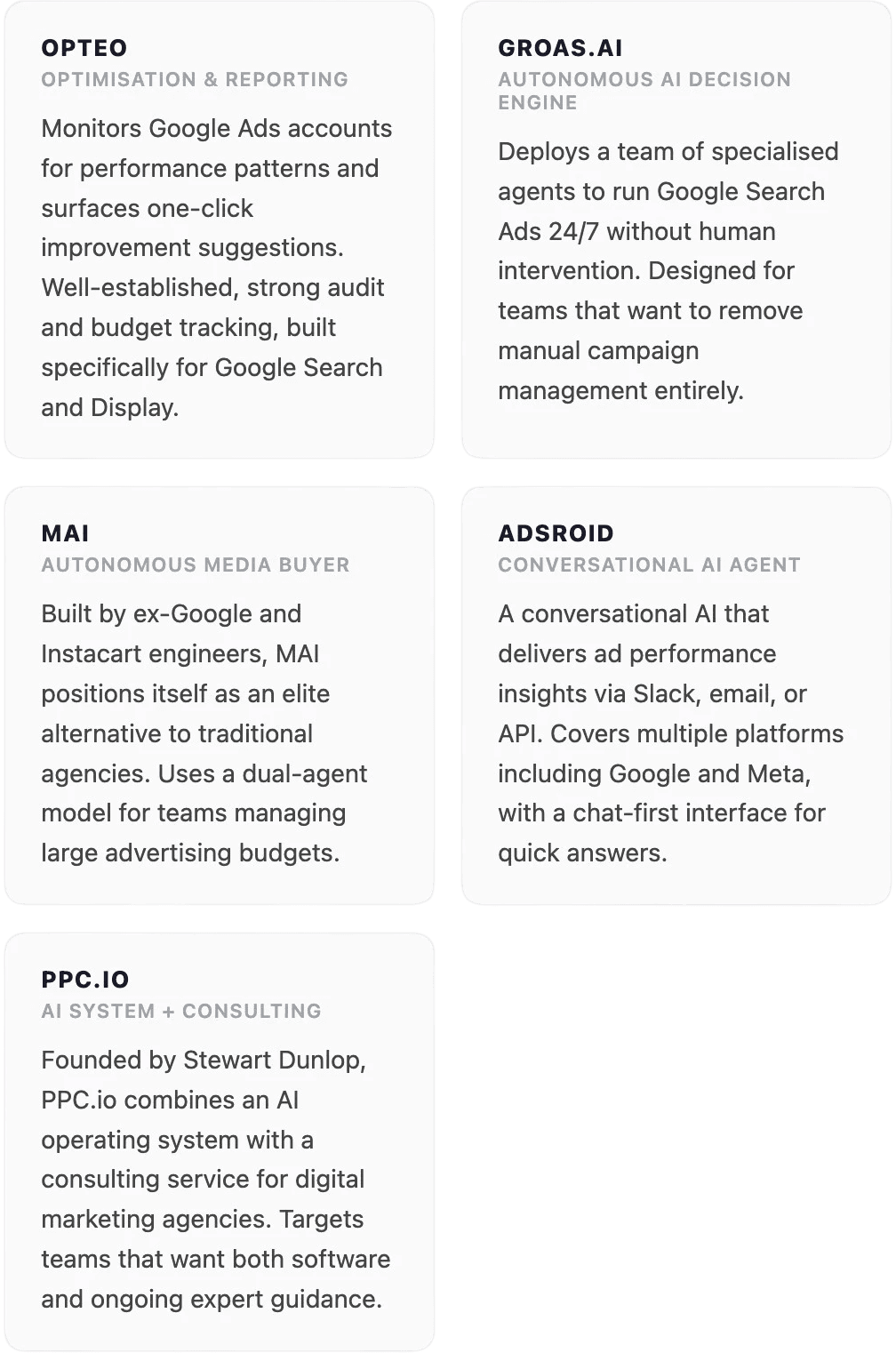
The five Google ADS tools in this comparison These are not the only AI tools available for Google Ads. They are five that each represent a distinct approach to the same problem, which makes the comparison meaningful. Each one is doing something genuinely different.
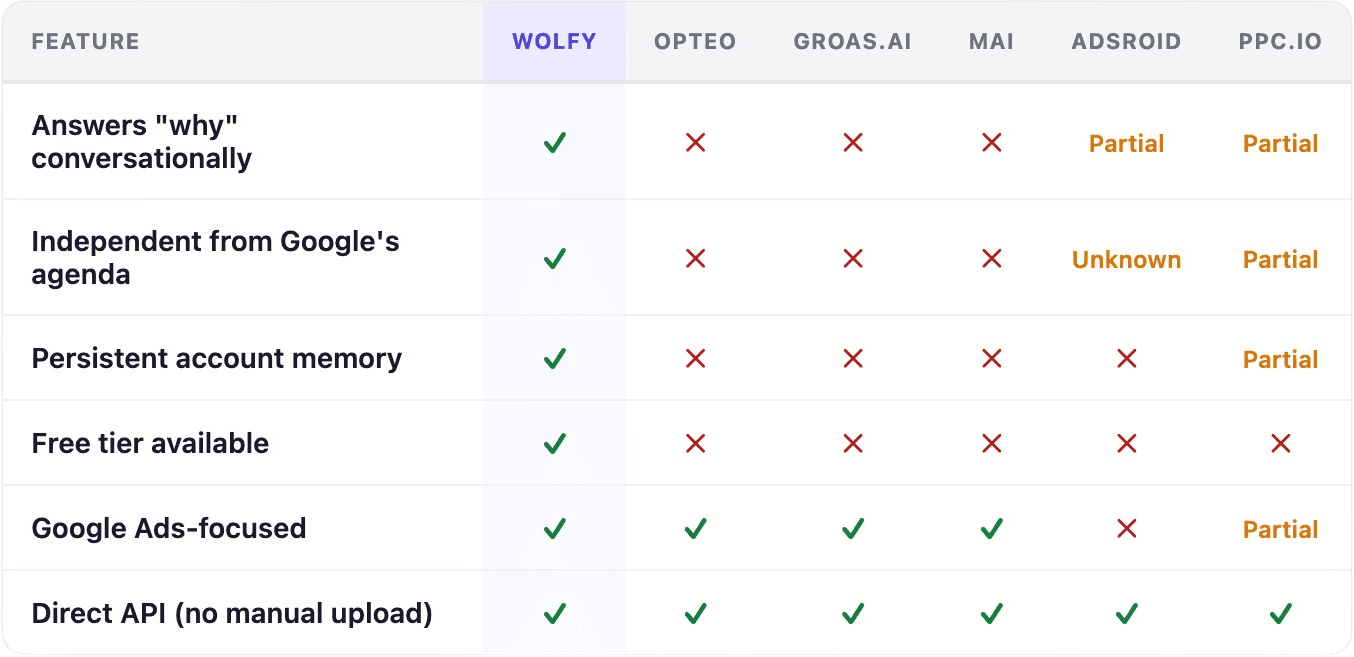
Head-to-head: how they compare on what actually matters The table below uses the four criteria from the first section, plus two practical considerations: whether the tool focuses on Google Ads specifically, and whether it connects to your account directly without manual data uploads.
The pattern is consistent. Most tools in this category do one thing well: they automate or accelerate a specific task. What none of the alternatives combine is conversational analysis, Google independence, and persistent account memory. Wolfy is the only tool in this comparison where all three overlap.
What Wolfy actually does differently compared to other Google ADS tools Wolfy is built by Flowboost, a Google Ads agency with over a decade of active campaign management. That origin shapes what the tool was designed to do in a way that pure software companies cannot replicate easily.
Most AI tools in this space were built by engineers who studied the Google Ads interface. Wolfy was built by people who ran campaigns every day and needed a faster way to get real answers. The difference shows in three specific places.
Answers, not just numbers. Ask Wolfy "why did conversions drop last week?" and it pulls the actual data from your account, identifies the pattern, and explains it in plain language. Not a chart. Not a list of possible causes. The actual story behind the numbers, backed by your account data. Other tools in this comparison either cannot do this at all, or do it only partially through a generic layer that lacks account context.
No Google agenda. Google's own recommendations, from automated bidding to Performance Max suggestions, are built to optimise for what generates revenue for Google. Wolfy operates independently of Google's commercial interests. Its analysis is aimed at improving your ROI, even when that means recommending you spend less or cut campaigns Google would prefer you keep running.
Remembers everything. Wolfy learns your account over time: naming conventions, campaign structures, target CPA by product, seasonal behaviour. Switch between accounts and it picks up exactly where you left off. No re-briefing, no re-explaining context. Every session builds on the last. This is the feature that most directly separates Wolfy from tools that connect via API but treat each conversation as a blank slate.
"We have been using Wolfy at DRIIVN for a few weeks now for our Google Ads analyses. During the weekly reports, the tool has already saved us a significant amount of time by processing and structuring data faster. What really adds value for us are the deeper insights Wolfy brings to the surface. The tool regularly finds patterns and opportunities, for example around wasted spend, that are not immediately visible in a manual analysis or would normally take a long time to uncover. A very valuable addition to our daily workflow."
Kevin Schut
-SEA Lead, DRIIVN-
Apply this yourself
If your current Google Ads tool requires you to manually export data, upload reports, or re-explain your account structure every session, you are doing work that should not exist. Wolfy connects directly via the Google Ads API and carries full account context between sessions. The gap becomes obvious the first time you ask a real question and get a real answer instead of a dashboard.
Pricing: what you get for what you pay Price comparisons for Google Ads management software are complicated by the fact that most competitors in this space do not publish standard pricing. A demo call tends to come before any number does. Wolfy is an exception.
Wolfy offers four plans:
Free — €0. A genuine free tier with no expiry date and no credit card required. Access to the conversational analysis engine and direct API connection.
Essential — €50/month. Full analysis capabilities for individual accounts or small portfolios.
Pro — €150/month. Multi-account management for up to 100 accounts, scheduled automated reports, and full memory across sessions.
Custom — custom pricing for large agencies and enterprise teams.
Of the tools in this comparison, tools positioned as autonomous media buyers or agency-grade AI systems tend to target clients spending hundreds of thousands to millions in ad spend, with pricing that reflects it. PPC.io adds a consulting component on top of the software cost. For teams that want software without ongoing consultant fees, Wolfy's Pro plan at €150 per month covers the full feature set across a substantial account portfolio.
Who is Wolfy the right tool for? This question matters more than it might appear, because the tools in this comparison have genuinely different target users. Some are a better fit for specific situations than Wolfy is, and it is worth being honest about that.
If you manage millions in ad spend and want fully autonomous campaign execution with no human in the loop, MAI or groas.ai are worth evaluating. They are built for that use case. If you need tight one-click optimisation prompts for a streamlined Google Search account, Opteo does that cleanly.
Wolfy is the right fit if you recognise any of these:
You run Google Ads for your own business and need a second opinion without an agency retainer
You manage client accounts and spend too many hours every week on performance reporting
You want to understand what is happening in your account, not just be told what to change
You manage multiple accounts and need a tool that keeps the context of each one intact
You want analysis that works for your ROI, not for Google's revenue targets
The same pattern that Google's March 2026 core update reinforced in organic search applies equally in paid: tools that treat your account as a unique entity with its own history outperform those that apply generic logic. Account memory is not a nice-to-have feature. It is the difference between a tool that learns your account and one that starts from zero every Monday morning.
Apply this yourself
List the three questions you ask most often about your Google Ads performance. If your current tool cannot answer them in a single conversation without exporting a report or clicking through multiple dashboards, those three questions are your reason to try Wolfy.
Getting started: four steps from sign-up to first insight Wolfy is designed to deliver a useful answer in the first session. This is how to get there.
Create a free account at flowboost.com/wolfy
No credit card required. The free plan gives you access to the full conversational engine and direct API connection. There is no pressure to upgrade before you have seen the tool work on your actual account.
Connect your Google Ads account via API
Wolfy connects through the Google Ads API. No manual data export, no spreadsheet upload, no copy-paste. Your data is not stored between sessions. The connection is read-only for analysis.
Ask your first real question
Not "show me last week's performance." Ask something you actually need answered: "Why did my cost per conversion increase in the last two weeks?" or "Where is budget being wasted this month?" Wolfy pulls the data, finds the pattern, and explains it. That first answer is where the difference becomes obvious.
Set up a scheduled weekly report
Once Wolfy knows your account, you can schedule a weekly summary that arrives automatically. Not a generic export: an analysis that highlights what changed, what caused it, and what to look at next. This is the feature that saves the most time for teams managing multiple accounts.
Apply this yourself
The best way to evaluate any Google Ads AI tool is to give it the question you have been sitting with longest. The one you keep meaning to dig into but never quite have time for. Connect Wolfy, ask it, and see what comes back. That single test is more informative than any feature list.
The investigation does not end when you have more data. It ends when you know what happened and what to do next. Every tool in this comparison helps you manage your Google Ads account in some way. Only one of them is built to tell you why something changed, remember what it found the next time you open it, and do all of that independently of the platform whose revenue depends on your ad spend staying high.
That is not a small distinction. It is the entire job description. Wolfy was built to fill it.