Tools

The Marie Kondo method for content pruning in SEO

The Marie Kondo method for content pruning in SEO

The Marie Kondo method for content pruning in SEO

By

Anne Bout

8 minutes

Anne Bout

8 minutes

Contents

No headings found

Does this page spark rankings? If not, it might be time to let it go.

Marie Kondo's first instruction is not to throw things away. It is to gather everything you own, bring it into one room, and look at it together for the first time. Only then do you see what you actually have. And only then do you see how much has been silently taking up space for years without you noticing.

Most website owners have never done this with their content. They have published steadily for years: a blog every fortnight, a new service page, a landing page for a campaign that ran in 2022. Each one made sense at the time. None of them were ever evaluated together.

Do it now and you will find pages ranking for nothing, linking to nothing, serving no one. You will find duplicates, abandoned categories, and campaign pages for promotions three years gone. You will find the SEO equivalent of the box of cables under the bed that you have moved four times without ever opening.

That´s why the marie kondo method is perfect for content pruning.

What is content pruning in SEO?

Content pruning is the practice of making deliberate decisions about every indexed page on your website. You assess each one and then you choose: keep it, combine it with another page, or remove it entirely. It is not about deleting content for the sake of minimalism. It is about ensuring that every URL Google indexes under your domain earns its place there.

The principle behind it is rooted in something fundamental about how Google evaluates a website. It does not form its view of your site purely by looking at individual pages in isolation. It reads the whole wardrobe. A site where a significant share of indexed pages generate no traffic, no links, and no meaningful engagement sends a quality signal that affects everything, including the pages that are performing well.

Content pruning vs. content audit: what is the difference?

A content audit is the inventory. You gather everything, spread it on the floor, and record what you find. It tells you what is there. Content pruning is what you do with that information: the decision phase, where you determine what stays, what gets merged, and what gets removed. Most websites that struggle with site quality have done neither. A good pruning process always starts with the audit.

Apply this yourself

Before you delete a single page, run a complete content audit first. Export every indexed URL from Screaming Frog, pull 12 months of traffic data per page from Google Search Console, and check inbound links for each URL in Semrush or Ahrefs. Lay everything on the floor. Then decide.

Why your website is probably more cluttered than you think

The average website that has been publishing for more than two years has accumulated a significant number of zombie pages: URLs that produce nothing. Not traffic, not conversions, not links. They are still indexed, still crawled, still counted as part of your site in Google's eyes, but they serve no one. They exist because someone once thought they were a good idea, published them, and moved on.

The categories are predictable:

  • Blog posts written for keywords that turned out to be too competitive

  • Service pages for offerings the business no longer provides

  • Category pages containing only one or two posts

  • Landing pages from campaigns that ended years ago

  • Event pages for events that have already passed

  • Near-duplicate content across URLs that were never consolidated

  • Tag and archive pages that exist only as technical byproducts

  • Pages with no internal links pointing to them from anywhere else on the site, what are known as orphan pages

Some of these pages were not always the problem. Content decay describes the gradual decline of pages that once performed well but have become outdated as search intent shifted, competitors improved their coverage, or the topic itself evolved. A page that ranked solidly in 2022 and now sits on page four is not automatically a delete candidate. It is a page that needs to be evaluated, and often updated, before any decision is made. Content decay is not a reason to remove a page. It is a reason to look at it.

None of these cause active harm in isolation. The problem is collective, and it has a name: index bloat. When a site accumulates dozens of pages that offer nothing, Google's crawlers still have to assess them all, wasting attention that should go to the content you actually want to rank. Worse, near-duplicate pages start competing with each other for the same queries. This is keyword cannibalization: your own URLs diluting each other's ranking power because Google cannot tell which one deserves the spot. A site where a large portion of indexed pages carry no traffic, no links, and no updated content reads as a site where quality is unevenly maintained. That impression does not stay on the underperforming pages. It spreads to the ones that would otherwise deserve to rank.

"Google does not judge each page in isolation. A site full of thin content is a site Google trusts less across the board, including the pages that would otherwise deserve to rank."

Kondo calls this the rebound effect: the reason tidying never sticks when you do it one item at a time. You remove one thing, but the surrounding clutter remains. The space never really changes. Content pruning works on the same logic. Fixing one weak page while the rest remain untouched does not shift the overall quality signal. The whole wardrobe needs a session. It is the same pattern that made Google's March 2026 core update so significant: sites that had let clutter accumulate saw drops, while sites with consistent, purposeful content held or gained.

Apply this yourself

Go to Google Search Console and export your top pages by clicks over the past 12 months. Then export a full list of all indexed URLs from Screaming Frog. Compare the two lists. The gap between them (the indexed pages that do not appear in your top performers) is where your pruning session begins.

The KonMari question: does this page spark rankings?

Kondo's famous question is: does this spark joy? The website equivalent is more specific. Does this page serve a purpose?

A page serves a purpose when it does at least one of the following:

  • Attracts organic traffic, even in modest amounts

  • Converts visitors into leads, subscribers, or customers

  • Earns inbound links from external websites

  • Supports other pages through meaningful internal linking

  • Contributes to your site's topical depth on a subject that matters to your business

A page needs only one of these to justify staying. A page that scores zero across all five, has not been updated in over a year, and covers a topic no longer central to your business is a page that does not spark rankings. That is the page Kondo would ask you to hold in your hands, thank sincerely, and release.

The harshest test

If a page disappeared tomorrow and no visitor, crawler, or customer noticed, it has no reason to exist. Apply that test to every page that has received fewer than ten clicks in the past twelve months and has not been substantially updated in over a year. That is your shortlist for the pruning session.

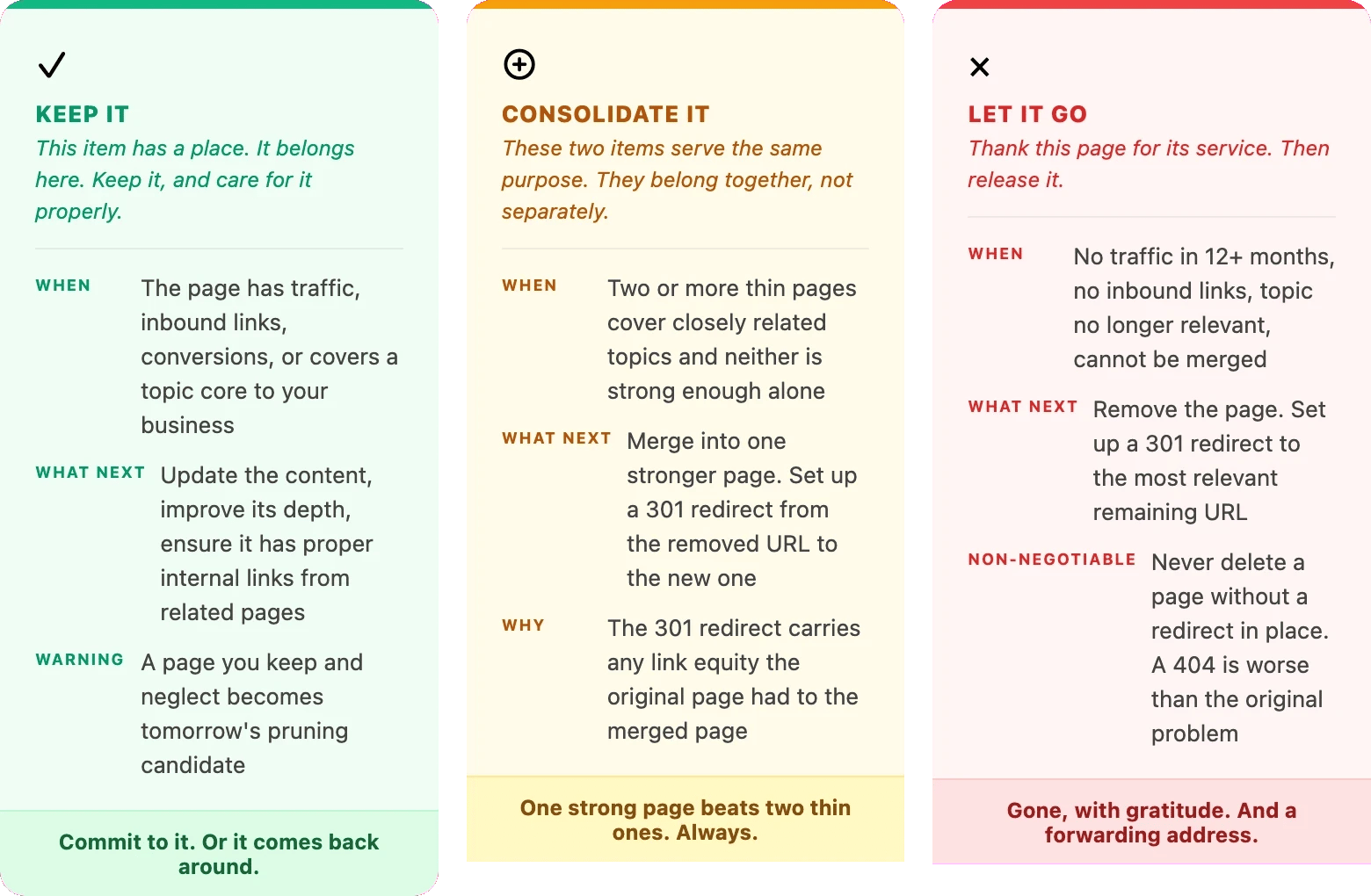
Three options: keep it, consolidate it, or let it go

Once you have your content audit in front of you, every page in it gets one of three decisions. This is not a complicated framework. It is the same process Kondo applies to a wardrobe, applied to a sitemap.

  • Relevant items: keep them

  • Duplicates: merge them

  • Irrelevant items: let them go

content pruning

Apply this yourself

Build a spreadsheet with one row per indexed URL and four columns: organic clicks (last 12 months), inbound links (count), last updated date, and your decision (K, C, or D). Work through every row. When every URL has a decision, that spreadsheet is your pruning plan. The session can then happen in a single focused block rather than across weeks of uncertain half-decisions.

How to run a content audit before you prune

Before any decision can be made, everything needs to be on the floor. Kondo is firm on this point: you cannot evaluate what you cannot see. A partial audit leads to partial decisions and partial results. The steps below form a content-focused SEO site audit: a complete, data-backed picture of every indexed page, assessed against four signals that determine whether it earns its place.

  1. Export all indexed URLs: Use Screaming Frog to crawl your site and export a list of every indexed URL. This is your complete inventory. Filter out non-indexable pages (noindex, canonical to other URLs) so you are only working with what Google can and does find.

  2. Pull 12 months of traffic data per URL: In Google Search Console, go to the Performance report and export clicks and impressions per page over the past 12 months. Paste this into your spreadsheet alongside the URL list. Any page with fewer than ten clicks in twelve months is an immediate candidate for review.

  3. Check inbound links per URL: Run your URL list through Semrush or Ahrefs and note how many external sites link to each page. A page with zero inbound links and zero traffic is a clean delete candidate. A page with inbound links but no traffic still has value you need to preserve through a redirect before removing it.

  4. Record the last updated date: For each page, note when it was last substantially updated. Pages untouched for more than two years that cover time-sensitive topics are natural candidates for review regardless of their traffic figures. Outdated content is a trust signal in the wrong direction.

  5. Assign a decision to every row: Work through the spreadsheet and label each URL: Keep, Consolidate, or Delete. Make decisions based on the data in front of you, not instinct. If you are unsure about a page, default to keep and schedule it for a proper update within 30 days. Uncertainty is not a reason to delete, it is a reason to investigate further.

Apply this yourself

Set aside a half day for the audit. Not an hour. The temptation is to do it quickly and make decisions on the fly, which leads to inconsistency. Run the tools the day before so the data is ready. On the audit day, work through every row in order. Do not skip pages because they feel uncertain. The ones that feel uncertain are usually the most important ones to decide.

A content pruning case study

Stuur Chauffeurs is a Dutch luxury car service that offers professional drivers for both private and business clients across the Netherlands.

After helping them achieve outstanding results through PPC, we identified significant room for improvement on the SEO side. Following a thorough audit, we discovered that the website's primary issues were keyword cannibalization and duplicate content. Our strategy focused on technical optimizations alongside a comprehensive content consolidation and optimization effort.

After eight months of executing the SEO strategy, Stuur Chauffeurs saw remarkable improvements in their organic performance:

  • Keyword rankings grew by more than 40%, with 18 keywords ranking in the top 3 and 63 appearing on the first page of Google.

  • 89 keywords got featured in SERP features, including AI Overviews

  • Organic traffic became the company's primary source of new visitors, with over 40% growth in both new users and sessions

  • ChatGPT referral traffic surged by an impressive 900%

You can read the full case study here!

What happens after you prune?

Expectations need to be set honestly here. Content pruning is not a fix you see the next morning. When you delete pages and set up 301 redirects, Google's crawlers will revisit those URLs over the following weeks, follow the redirects, and update their index. The technical process takes time, typically two to four weeks before removed pages stop appearing as indexed.

What you will notice first is a change in crawl behaviour. Google Search Console will begin showing the removed URLs as redirects rather than indexed pages. Crawl frequency on your remaining pages may increase as Googlebot spends less time on dead ends and thin content. These are early signals that the process is working. They are not yet ranking changes.

The ranking impact on the pages you kept and improved becomes visible over a longer window, often four to eight weeks after the main pruning session. The quality signal across the domain has shifted. The wardrobe is tidier. The things that remain have more room to breathe, and Google has more reason to trust what it finds when it visits. That confidence does not arrive immediately. But it compounds.

One rule before you start

Only delete pages where a 301 redirect is already in place. Never leave a removed URL without a destination. A page that returns a 404 is worse than a thin page, because it breaks paths for users and wastes crawl budget on a dead end. The redirect is not optional. It is the last act of gratitude before the page is gone.

On frequency: once a year as a scheduled session is a solid baseline for most websites. Outside of that, two triggers should prompt an earlier review. A Google core update that produces a measurable ranking drop (check Search Console against the update window) is a signal that page quality is being re-evaluated and worth auditing in response. A sustained decline in organic traffic across pages that have not changed is the second trigger. Both suggest Google is looking at your site differently. A content audit tells you what it is seeing.

Apply this yourself

Set a reminder for eight weeks after your pruning session completes. Open Google Search Console and compare your top pages data against the period before the audit. Look specifically at the pages you kept and improved. Any gain in average position or click-through rate on those pages is a direct signal that the quality shift is being registered. That data is also your evidence for the next time someone asks whether content pruning was worth it.

Kondo's method produces a specific feeling when it is complete. Not emptiness. Clarity. The things that remain have a reason to be there. The space works differently. And the things you actually value are finally visible, because nothing is competing with them for attention.

A pruned website produces the same result. Fewer indexed pages, but pages that carry weight. A domain where every URL earns its place. A crawl budget spent on content worth finding. A site where quality was a deliberate choice rather than a by-product of years of publishing without looking back. Kondo says tidying is not the goal. It is the beginning. Once the clutter is gone, the thing you actually wanted to build finally has room to grow.


Anne Bout

LinkedIn author:

Meet Wolfy

Triple your productivity with Wolfy, the dedicated Google Ads agent.

Read more

Contents

No headings found

Does this page spark rankings? If not, it might be time to let it go.

Marie Kondo's first instruction is not to throw things away. It is to gather everything you own, bring it into one room, and look at it together for the first time. Only then do you see what you actually have. And only then do you see how much has been silently taking up space for years without you noticing.

Most website owners have never done this with their content. They have published steadily for years: a blog every fortnight, a new service page, a landing page for a campaign that ran in 2022. Each one made sense at the time. None of them were ever evaluated together.

Do it now and you will find pages ranking for nothing, linking to nothing, serving no one. You will find duplicates, abandoned categories, and campaign pages for promotions three years gone. You will find the SEO equivalent of the box of cables under the bed that you have moved four times without ever opening.

That´s why the marie kondo method is perfect for content pruning.

What is content pruning in SEO?

Content pruning is the practice of making deliberate decisions about every indexed page on your website. You assess each one and then you choose: keep it, combine it with another page, or remove it entirely. It is not about deleting content for the sake of minimalism. It is about ensuring that every URL Google indexes under your domain earns its place there.

The principle behind it is rooted in something fundamental about how Google evaluates a website. It does not form its view of your site purely by looking at individual pages in isolation. It reads the whole wardrobe. A site where a significant share of indexed pages generate no traffic, no links, and no meaningful engagement sends a quality signal that affects everything, including the pages that are performing well.

Content pruning vs. content audit: what is the difference?

A content audit is the inventory. You gather everything, spread it on the floor, and record what you find. It tells you what is there. Content pruning is what you do with that information: the decision phase, where you determine what stays, what gets merged, and what gets removed. Most websites that struggle with site quality have done neither. A good pruning process always starts with the audit.

Apply this yourself

Before you delete a single page, run a complete content audit first. Export every indexed URL from Screaming Frog, pull 12 months of traffic data per page from Google Search Console, and check inbound links for each URL in Semrush or Ahrefs. Lay everything on the floor. Then decide.

Why your website is probably more cluttered than you think

The average website that has been publishing for more than two years has accumulated a significant number of zombie pages: URLs that produce nothing. Not traffic, not conversions, not links. They are still indexed, still crawled, still counted as part of your site in Google's eyes, but they serve no one. They exist because someone once thought they were a good idea, published them, and moved on.

The categories are predictable:

  • Blog posts written for keywords that turned out to be too competitive

  • Service pages for offerings the business no longer provides

  • Category pages containing only one or two posts

  • Landing pages from campaigns that ended years ago

  • Event pages for events that have already passed

  • Near-duplicate content across URLs that were never consolidated

  • Tag and archive pages that exist only as technical byproducts

  • Pages with no internal links pointing to them from anywhere else on the site, what are known as orphan pages

Some of these pages were not always the problem. Content decay describes the gradual decline of pages that once performed well but have become outdated as search intent shifted, competitors improved their coverage, or the topic itself evolved. A page that ranked solidly in 2022 and now sits on page four is not automatically a delete candidate. It is a page that needs to be evaluated, and often updated, before any decision is made. Content decay is not a reason to remove a page. It is a reason to look at it.

None of these cause active harm in isolation. The problem is collective, and it has a name: index bloat. When a site accumulates dozens of pages that offer nothing, Google's crawlers still have to assess them all, wasting attention that should go to the content you actually want to rank. Worse, near-duplicate pages start competing with each other for the same queries. This is keyword cannibalization: your own URLs diluting each other's ranking power because Google cannot tell which one deserves the spot. A site where a large portion of indexed pages carry no traffic, no links, and no updated content reads as a site where quality is unevenly maintained. That impression does not stay on the underperforming pages. It spreads to the ones that would otherwise deserve to rank.

"Google does not judge each page in isolation. A site full of thin content is a site Google trusts less across the board, including the pages that would otherwise deserve to rank."

Kondo calls this the rebound effect: the reason tidying never sticks when you do it one item at a time. You remove one thing, but the surrounding clutter remains. The space never really changes. Content pruning works on the same logic. Fixing one weak page while the rest remain untouched does not shift the overall quality signal. The whole wardrobe needs a session. It is the same pattern that made Google's March 2026 core update so significant: sites that had let clutter accumulate saw drops, while sites with consistent, purposeful content held or gained.

Apply this yourself

Go to Google Search Console and export your top pages by clicks over the past 12 months. Then export a full list of all indexed URLs from Screaming Frog. Compare the two lists. The gap between them (the indexed pages that do not appear in your top performers) is where your pruning session begins.

The KonMari question: does this page spark rankings?

Kondo's famous question is: does this spark joy? The website equivalent is more specific. Does this page serve a purpose?

A page serves a purpose when it does at least one of the following:

  • Attracts organic traffic, even in modest amounts

  • Converts visitors into leads, subscribers, or customers

  • Earns inbound links from external websites

  • Supports other pages through meaningful internal linking

  • Contributes to your site's topical depth on a subject that matters to your business

A page needs only one of these to justify staying. A page that scores zero across all five, has not been updated in over a year, and covers a topic no longer central to your business is a page that does not spark rankings. That is the page Kondo would ask you to hold in your hands, thank sincerely, and release.

The harshest test

If a page disappeared tomorrow and no visitor, crawler, or customer noticed, it has no reason to exist. Apply that test to every page that has received fewer than ten clicks in the past twelve months and has not been substantially updated in over a year. That is your shortlist for the pruning session.

Three options: keep it, consolidate it, or let it go

Once you have your content audit in front of you, every page in it gets one of three decisions. This is not a complicated framework. It is the same process Kondo applies to a wardrobe, applied to a sitemap.

  • Relevant items: keep them

  • Duplicates: merge them

  • Irrelevant items: let them go

content pruning

Apply this yourself

Build a spreadsheet with one row per indexed URL and four columns: organic clicks (last 12 months), inbound links (count), last updated date, and your decision (K, C, or D). Work through every row. When every URL has a decision, that spreadsheet is your pruning plan. The session can then happen in a single focused block rather than across weeks of uncertain half-decisions.

How to run a content audit before you prune

Before any decision can be made, everything needs to be on the floor. Kondo is firm on this point: you cannot evaluate what you cannot see. A partial audit leads to partial decisions and partial results. The steps below form a content-focused SEO site audit: a complete, data-backed picture of every indexed page, assessed against four signals that determine whether it earns its place.

  1. Export all indexed URLs: Use Screaming Frog to crawl your site and export a list of every indexed URL. This is your complete inventory. Filter out non-indexable pages (noindex, canonical to other URLs) so you are only working with what Google can and does find.

  2. Pull 12 months of traffic data per URL: In Google Search Console, go to the Performance report and export clicks and impressions per page over the past 12 months. Paste this into your spreadsheet alongside the URL list. Any page with fewer than ten clicks in twelve months is an immediate candidate for review.

  3. Check inbound links per URL: Run your URL list through Semrush or Ahrefs and note how many external sites link to each page. A page with zero inbound links and zero traffic is a clean delete candidate. A page with inbound links but no traffic still has value you need to preserve through a redirect before removing it.

  4. Record the last updated date: For each page, note when it was last substantially updated. Pages untouched for more than two years that cover time-sensitive topics are natural candidates for review regardless of their traffic figures. Outdated content is a trust signal in the wrong direction.

  5. Assign a decision to every row: Work through the spreadsheet and label each URL: Keep, Consolidate, or Delete. Make decisions based on the data in front of you, not instinct. If you are unsure about a page, default to keep and schedule it for a proper update within 30 days. Uncertainty is not a reason to delete, it is a reason to investigate further.

Apply this yourself

Set aside a half day for the audit. Not an hour. The temptation is to do it quickly and make decisions on the fly, which leads to inconsistency. Run the tools the day before so the data is ready. On the audit day, work through every row in order. Do not skip pages because they feel uncertain. The ones that feel uncertain are usually the most important ones to decide.

A content pruning case study

Stuur Chauffeurs is a Dutch luxury car service that offers professional drivers for both private and business clients across the Netherlands.

After helping them achieve outstanding results through PPC, we identified significant room for improvement on the SEO side. Following a thorough audit, we discovered that the website's primary issues were keyword cannibalization and duplicate content. Our strategy focused on technical optimizations alongside a comprehensive content consolidation and optimization effort.

After eight months of executing the SEO strategy, Stuur Chauffeurs saw remarkable improvements in their organic performance:

  • Keyword rankings grew by more than 40%, with 18 keywords ranking in the top 3 and 63 appearing on the first page of Google.

  • 89 keywords got featured in SERP features, including AI Overviews

  • Organic traffic became the company's primary source of new visitors, with over 40% growth in both new users and sessions

  • ChatGPT referral traffic surged by an impressive 900%

You can read the full case study here!

What happens after you prune?

Expectations need to be set honestly here. Content pruning is not a fix you see the next morning. When you delete pages and set up 301 redirects, Google's crawlers will revisit those URLs over the following weeks, follow the redirects, and update their index. The technical process takes time, typically two to four weeks before removed pages stop appearing as indexed.

What you will notice first is a change in crawl behaviour. Google Search Console will begin showing the removed URLs as redirects rather than indexed pages. Crawl frequency on your remaining pages may increase as Googlebot spends less time on dead ends and thin content. These are early signals that the process is working. They are not yet ranking changes.

The ranking impact on the pages you kept and improved becomes visible over a longer window, often four to eight weeks after the main pruning session. The quality signal across the domain has shifted. The wardrobe is tidier. The things that remain have more room to breathe, and Google has more reason to trust what it finds when it visits. That confidence does not arrive immediately. But it compounds.

One rule before you start

Only delete pages where a 301 redirect is already in place. Never leave a removed URL without a destination. A page that returns a 404 is worse than a thin page, because it breaks paths for users and wastes crawl budget on a dead end. The redirect is not optional. It is the last act of gratitude before the page is gone.

On frequency: once a year as a scheduled session is a solid baseline for most websites. Outside of that, two triggers should prompt an earlier review. A Google core update that produces a measurable ranking drop (check Search Console against the update window) is a signal that page quality is being re-evaluated and worth auditing in response. A sustained decline in organic traffic across pages that have not changed is the second trigger. Both suggest Google is looking at your site differently. A content audit tells you what it is seeing.

Apply this yourself

Set a reminder for eight weeks after your pruning session completes. Open Google Search Console and compare your top pages data against the period before the audit. Look specifically at the pages you kept and improved. Any gain in average position or click-through rate on those pages is a direct signal that the quality shift is being registered. That data is also your evidence for the next time someone asks whether content pruning was worth it.

Kondo's method produces a specific feeling when it is complete. Not emptiness. Clarity. The things that remain have a reason to be there. The space works differently. And the things you actually value are finally visible, because nothing is competing with them for attention.

A pruned website produces the same result. Fewer indexed pages, but pages that carry weight. A domain where every URL earns its place. A crawl budget spent on content worth finding. A site where quality was a deliberate choice rather than a by-product of years of publishing without looking back. Kondo says tidying is not the goal. It is the beginning. Once the clutter is gone, the thing you actually wanted to build finally has room to grow.

Anne Bout

LinkedIn author:

Meet Wolfy

Triple your productivity with Wolfy, the dedicated Google Ads agent.

Read more

Frequently asked questions

Frequently asked questions

What is content pruning in SEO?

Does deleting pages hurt SEO?

Should I delete old blog posts?

What is thin content and why does it matter for content pruning?

How often should you do a content audit?