Tools

How to change a domain name without starting from zero

How to change a domain name without starting from zero

How to change a domain name without starting from zero

By

Anne

9 minutes

Anne

9 minutes

Contents

No headings found

Rebranding, fixing an old naming mistake, or just moving on, whatever the reason, no platform lets you simply rename an existing domain. Here is what changing your domain name does to your SEO, and how to do it properly without losing everything you have built.

You get married, sign the papers, and drive home with a new surname. Except your bank still has the old one on file. Your doctor's office still has the old one. Half your mail arrives for someone who, legally, does not exist anymore.

Nobody erased your history when you took a new name. They just needed time, and the right paperwork, to catch up. Changing your domain name works exactly the same way.

What actually happens when you change your domain name

A domain name change is a bigger move than it looks. People often lump it in with smaller changes under the umbrella of a site migration, but Google treats it differently. Switching from http to https, dropping a www, or renaming a folder path are all handled with ordinary redirects and canonical tags (a bit of code on the page that tells Google which version of a URL is the one to actually index), and Google says plainly you should not use its dedicated migration tool for any of those. An actual domain name change is not like that. You are trading one identity, oldbusiness.com, for another, newbusiness.com, and every system that ever recognized the old name now has to be told, individually, that you are still the same business underneath.

That is also the honest answer to "can I change my domain name?" Yes, any domain you own can be replaced with a different one. What nobody can do, on any platform, is edit the existing domain into a new spelling. Squarespace, Wix, Shopify and WordPress all handle it the same way under the hood: you connect the new domain and point the old one at it. You do not rename it in place, the same way getting married does not cross out your old surname and scribble the new one on top. You get an entirely new document instead, and every institution that knew the old name has to be handed a copy.

Apply this yourself

Before you touch any settings, write down every place your current domain name is printed or stored: business cards, email signatures, your Google Business Profile, invoices, app store listings, any backlinks you know about by name. That list is your paperwork checklist, and most of it has nothing to do with your CMS.

What happens to your SEO when changing your domain name

Type “change domain SEO” or “changing domain name SEO” into Google, and most of what comes back is worry about redirect risk, not risk from the new name itself. That worry is well placed, since redirects are what actually determine whether the move goes smoothly. The foundational fact here is the same as with any redirect: Google's own documentation confirms that 301 redirects do not cause a loss in PageRank, Google's internal score for how much authority a page has built up over time. A domain change done with a live 301 on every URL is not a penalty waiting to happen. It is paperwork that needs to be done.

Google also runs a dedicated Change of Address tool in Search Console specifically for this move. You file it after your redirects are already live, not before, and only once you own both the old and new domain as verified properties (meaning you have already proven ownership of each one in Search Console) under the same Google account. Two details catch people out. The tool only works at the domain level, so it will not automatically carry over a www subdomain unless you submit that variant separately too. And Google explicitly warns against chaining moves, meaning you should not file a second change of address before the first one has settled. Once filed, Google forwards ranking signals from the old domain to the new one for 180 days. After that window, if the old domain is still live and crawlable (meaning Google's bots can still reach and read it), Google treats it as a fully unrelated site.

This is not a hypothetical worry. One detailed migration writeup on hooshmand.net documents a .net to .com switch done entirely by the book: server-level 301 redirects, the Change of Address tool filed, an Ahrefs scan run to catch errors before launch. Even so, traffic fell 90% and took a year and a half to fully recover.

Two other migrations the same writeup tracked down went differently. Ancient.eu, a site doing over 3 million sessions a month, moved to worldhistory.org and recovered within about six weeks, going on to exceed its old traffic within a year. Vihara.nl's move to meditatieinstituut.nl stayed flat for roughly half a year, until its owner created a separate Search Console property for every variant of the old domain (http, https, www and non-www) and ran the Change of Address tool on each one individually. Traffic started climbing again shortly after.

The lesson: the 180-day signal window Google quotes is a minimum, not a promise. Real recoveries in these documented cases ranged from six weeks to a year and a half.

The other detail worth knowing before you touch anything: Google's guidance says a move goes smoothest when the new domain keeps the same site structure as the old one. Combine a domain change with a full redesign, new URLs, new categories, a different page count, and you are asking Google to relearn your entire site at the same time it is relearning your name. That is when a straightforward domain name change turns into a multi-month traffic dip.

Apply this yourself

If you are planning a redesign anyway, do it in two moves instead of one. Change your domain name first, wait for traffic to settle, then redesign on the new domain once Google already trusts it as the same site.

What happens to your domain rating when you change domains

Ahrefs Domain Rating measures the strength of a domain's backlink profile, and Google has confirmed it does not use DR, or any third-party metric like it, in its own ranking systems. Ahrefs is not the only company scoring this, it is just the one that named its version Domain Rating. Semrush calls the same idea Authority Score, Moz calls it Domain Authority, and each tool crawls the web and weighs backlinks differently, so the same domain rarely gets the same number in two different tools. Whichever one you check, an ahrefs domain rating change, or a dip in Authority Score or Domain Authority, is one of the most common surprises people report right after a migration, and it is worth understanding rather than panicking over. The score is tied to the domain that backlinks physically point at, and the moment you switch to newbusiness.com, none of your old backlinks are pointing at it yet, they are still pointing at oldbusiness.com. That is why these tools first have to recrawl the web, notice that those old links now redirect to your new domain, and reattribute that authority, before your new domain's score reflects your real backlink profile.

That process is not instant, so expect your new domain's score, whichever tool reports it, to lag behind your real backlink profile for a while, even with every redirect correctly in place. The dip is temporary and has nothing to do with Google rankings. It only affects how your domain looks to outreach tools, competitor research and anyone judging you by that one number.

The name change done properly versus the fresh start that never was

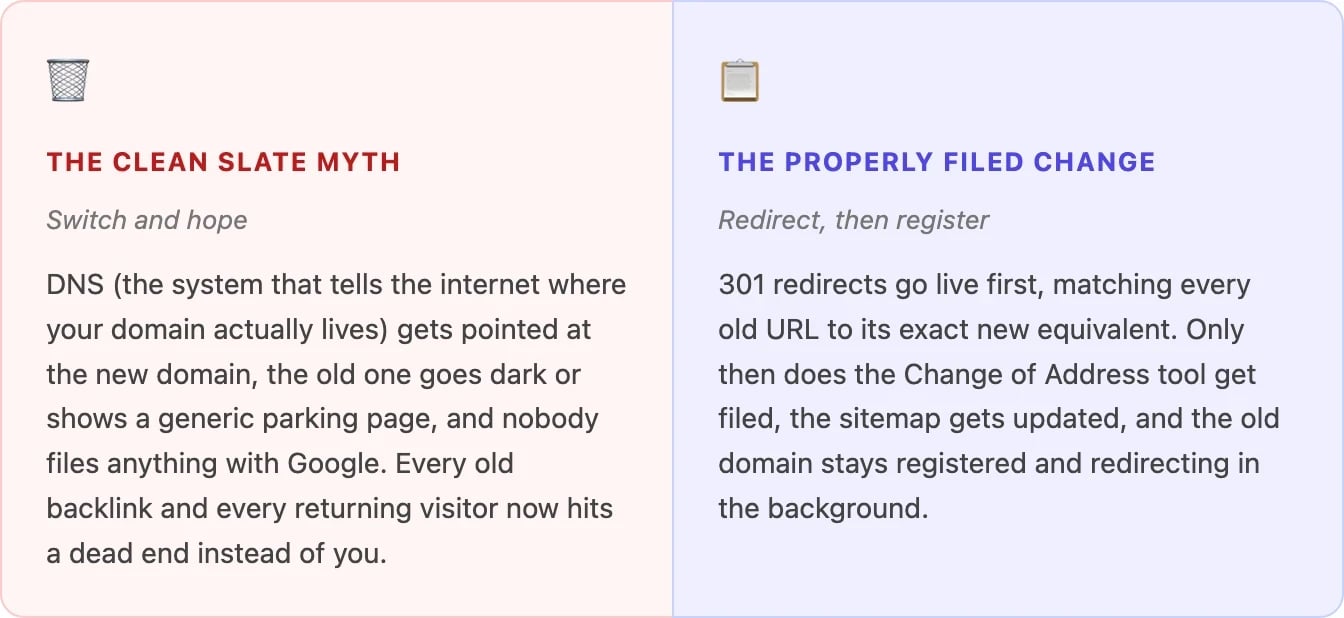
A lot of migrations go wrong because someone treats a domain change as a clean slate, a chance to start fresh instead of a move that needs paperwork. Side by side, the difference between the two approaches is stark.
How to change your domain name without losing your SEO

Changing your domain name safely is really a sequencing problem. Skip a step or do them out of order, and you create exactly the kind of gap Google and your visitors fall through. Work through the steps below yourself, or hand the move to a dedicated SEO team and check back once the redirects are confirmed.

  1. Get the new domain fully live before you redirect anything. Build and check the new site on newbusiness.com first. Do not touch the old domain until the new one actually works.

  2. Put a 301 redirect on every URL, not just the homepage. Each old page should forward to its matching new page. A blanket redirect that sends every old URL to the new homepage throws away the exact-match signal Google relies on.

  3. File the move with Google's Change of Address tool. Do this only once the redirects are live, and only from a domain-level property. Repeat it for every subdomain variant of the old domain, including www, since the tool does not move those automatically.

  4. Update your sitemap and your internal links. Submit a fresh XML sitemap for the new domain, and point internal links directly at the new URLs instead of letting them redirect through the old ones, similar to cleaning up a redirect chain.

  5. Reach out about your highest-value backlinks. The redirect carries the SEO signal regardless, but a link that points directly at your new domain is one hop faster for both visitors and crawlers.

  6. Keep the old domain registered and redirecting for at least a year. Google's own guidance recommends this specifically to stop someone else buying your abandoned domain and repurposing your old traffic and backlinks for something malicious.

Apply this yourself

Pull your 10 highest-traffic URLs from the old domain and confirm today that each one has a working 301 to its exact match on the new domain. That short list is where most botched migrations quietly fall apart.

Changing your domain name, platform by platform

The redirect logic above is the same everywhere. What differs is where you click to connect the new domain in the first place. WordPress and Shopify get the deepest walkthrough here, since they're among the most widely used platforms. The rest follow the same pattern in fewer words.

WordPress change domain

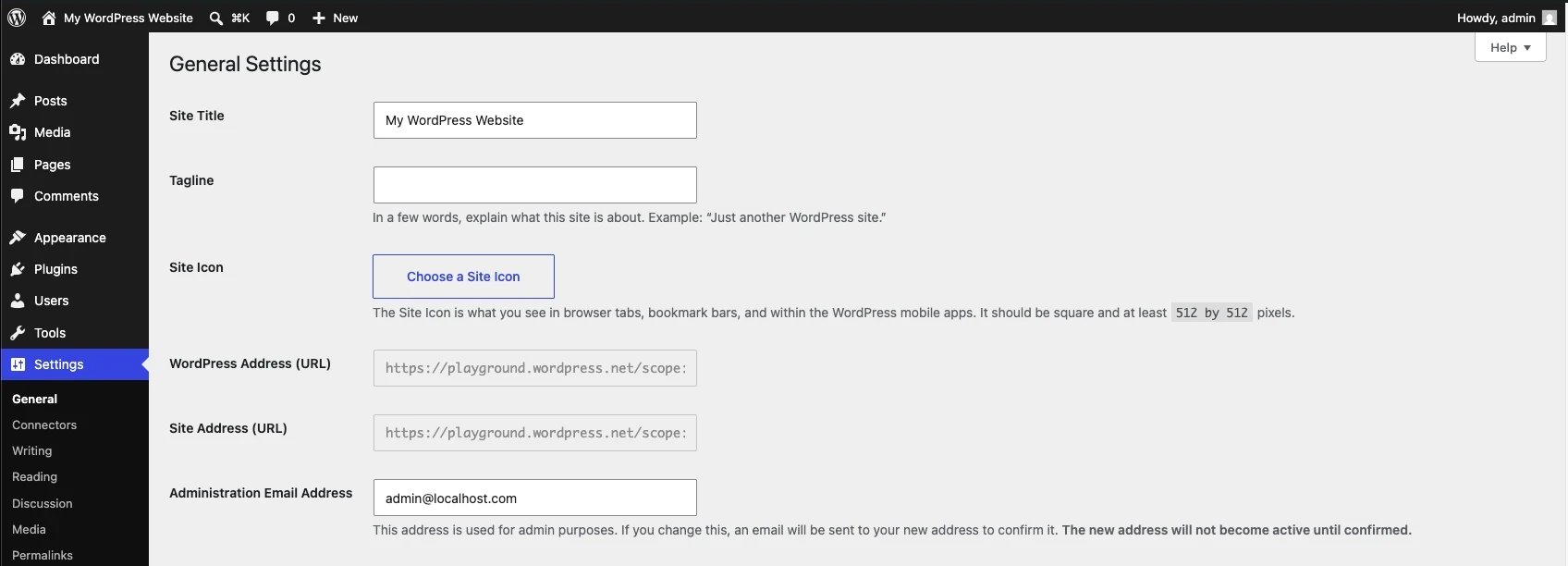
This one runs through your own settings rather than a domain dashboard. Update the "WordPress Address (URL)" and "Site Address (URL)" fields under Settings, General. Do not run a plain find-and-replace on your database afterward. WordPress stores some values as serialized data, and a blind text swap corrupts it. Use a migration tool built to handle serialized data instead, or a redirect plugin like Redirection if you would rather not touch .htaccess by hand. WordPress itself does not create the redirect for you, so you still need to add that 301 at the server or plugin level.
How to change domain on Shopify

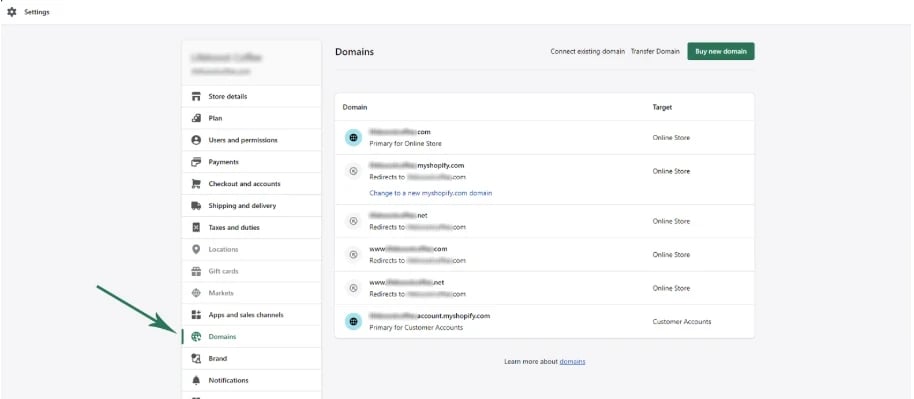
Connect the new domain as a custom domain first and wait for it to show as Connected, which can take up to 48 hours (occasionally longer, so hold off announcing the new address until it actually shows). Then go to Settings, Domains, select the new domain, and use Change domain type to set it as your primary domain. Every other domain still connected to the store, including the default myshopify.com address, then redirects to it automatically, as long as you leave it connected instead of deleting it.
Squarespace and Wix

Follow the same idea, in short: on Squarespace, connect the new domain through its DNS settings or a CNAME record (a specific type of DNS entry that points one domain to another) under Domains, or use Move Domain if both sites already live on Squarespace. On Wix, you cannot edit an existing domain, only assign a different one, and choosing redirect over replace keeps the old address forwarding to the new one.

Webflow, Framer and Lightspeed

Briefly: Webflow lets you connect both the old and new domain under Site settings, Publishing, Production, then click Make default next to the new one, which redirects every other connected domain automatically. Framer only handles the connection, under Site Settings, Domains, Connect a domain you own, so the old domain's redirect is still yours to set up at your registrar. Lightspeed works similarly: set your fallback subdomain as default under Settings, Domains, add the new domain, and its own documentation is explicit that the redirect from the old domain is a separate step you configure with your domain provider.

Running something else? The pattern repeats everywhere. Find your platform's domain settings, connect the new domain, set it as primary or default, and check whether that step created a redirect from the old domain automatically. If the platform's own documentation does not say it did, assume it did not, and add the 301 yourself.

Connecting is not the same as redirecting

Shopify, Wix and Webflow will forward an old domain to the new one automatically, once you set the new one as primary or default and keep the old one connected rather than deleting it. Squarespace's third-party domain connect, Framer and Lightspeed expect you to set up that redirect yourself, at the DNS or registrar level.

Apply this yourself

Whichever platform you are on, check whether connecting the new domain gave you an automatic redirect from the old one or just switched the primary address. If it only switched the address, your old domain is now a dead end until you add the 301 yourself.

Nobody at your wedding cared whether you filed the paperwork afterward. That part was never the romantic bit. It is just telling the bank, the doctor's office, the DMV, one institution at a time, that you are still the same person, only with a new name on file.

Your domain name change works the same way. Nobody ranks you higher because the address looks newer. What decides whether it costs you anything is whether every old URL, every backlink, every bookmark, still finds its way to the same business underneath. File the paperwork. Keep the old name registered a while longer, just in case. Let the redirects do what the new name alone never could.

Anne

LinkedIn author:

Meet Wolfy

Triple your productivity with Wolfy, the dedicated Google Ads agent.

Direct contact

Contents

No headings found

Rebranding, fixing an old naming mistake, or just moving on, whatever the reason, no platform lets you simply rename an existing domain. Here is what changing your domain name does to your SEO, and how to do it properly without losing everything you have built.

You get married, sign the papers, and drive home with a new surname. Except your bank still has the old one on file. Your doctor's office still has the old one. Half your mail arrives for someone who, legally, does not exist anymore.

Nobody erased your history when you took a new name. They just needed time, and the right paperwork, to catch up. Changing your domain name works exactly the same way.

What actually happens when you change your domain name

A domain name change is a bigger move than it looks. People often lump it in with smaller changes under the umbrella of a site migration, but Google treats it differently. Switching from http to https, dropping a www, or renaming a folder path are all handled with ordinary redirects and canonical tags (a bit of code on the page that tells Google which version of a URL is the one to actually index), and Google says plainly you should not use its dedicated migration tool for any of those. An actual domain name change is not like that. You are trading one identity, oldbusiness.com, for another, newbusiness.com, and every system that ever recognized the old name now has to be told, individually, that you are still the same business underneath.

That is also the honest answer to "can I change my domain name?" Yes, any domain you own can be replaced with a different one. What nobody can do, on any platform, is edit the existing domain into a new spelling. Squarespace, Wix, Shopify and WordPress all handle it the same way under the hood: you connect the new domain and point the old one at it. You do not rename it in place, the same way getting married does not cross out your old surname and scribble the new one on top. You get an entirely new document instead, and every institution that knew the old name has to be handed a copy.

Apply this yourself

Before you touch any settings, write down every place your current domain name is printed or stored: business cards, email signatures, your Google Business Profile, invoices, app store listings, any backlinks you know about by name. That list is your paperwork checklist, and most of it has nothing to do with your CMS.

What happens to your SEO when changing your domain name

Type “change domain SEO” or “changing domain name SEO” into Google, and most of what comes back is worry about redirect risk, not risk from the new name itself. That worry is well placed, since redirects are what actually determine whether the move goes smoothly. The foundational fact here is the same as with any redirect: Google's own documentation confirms that 301 redirects do not cause a loss in PageRank, Google's internal score for how much authority a page has built up over time. A domain change done with a live 301 on every URL is not a penalty waiting to happen. It is paperwork that needs to be done.

Google also runs a dedicated Change of Address tool in Search Console specifically for this move. You file it after your redirects are already live, not before, and only once you own both the old and new domain as verified properties (meaning you have already proven ownership of each one in Search Console) under the same Google account. Two details catch people out. The tool only works at the domain level, so it will not automatically carry over a www subdomain unless you submit that variant separately too. And Google explicitly warns against chaining moves, meaning you should not file a second change of address before the first one has settled. Once filed, Google forwards ranking signals from the old domain to the new one for 180 days. After that window, if the old domain is still live and crawlable (meaning Google's bots can still reach and read it), Google treats it as a fully unrelated site.

This is not a hypothetical worry. One detailed migration writeup on hooshmand.net documents a .net to .com switch done entirely by the book: server-level 301 redirects, the Change of Address tool filed, an Ahrefs scan run to catch errors before launch. Even so, traffic fell 90% and took a year and a half to fully recover.

Two other migrations the same writeup tracked down went differently. Ancient.eu, a site doing over 3 million sessions a month, moved to worldhistory.org and recovered within about six weeks, going on to exceed its old traffic within a year. Vihara.nl's move to meditatieinstituut.nl stayed flat for roughly half a year, until its owner created a separate Search Console property for every variant of the old domain (http, https, www and non-www) and ran the Change of Address tool on each one individually. Traffic started climbing again shortly after.

The lesson: the 180-day signal window Google quotes is a minimum, not a promise. Real recoveries in these documented cases ranged from six weeks to a year and a half.

The other detail worth knowing before you touch anything: Google's guidance says a move goes smoothest when the new domain keeps the same site structure as the old one. Combine a domain change with a full redesign, new URLs, new categories, a different page count, and you are asking Google to relearn your entire site at the same time it is relearning your name. That is when a straightforward domain name change turns into a multi-month traffic dip.

Apply this yourself

If you are planning a redesign anyway, do it in two moves instead of one. Change your domain name first, wait for traffic to settle, then redesign on the new domain once Google already trusts it as the same site.

What happens to your domain rating when you change domains

Ahrefs Domain Rating measures the strength of a domain's backlink profile, and Google has confirmed it does not use DR, or any third-party metric like it, in its own ranking systems. Ahrefs is not the only company scoring this, it is just the one that named its version Domain Rating. Semrush calls the same idea Authority Score, Moz calls it Domain Authority, and each tool crawls the web and weighs backlinks differently, so the same domain rarely gets the same number in two different tools. Whichever one you check, an ahrefs domain rating change, or a dip in Authority Score or Domain Authority, is one of the most common surprises people report right after a migration, and it is worth understanding rather than panicking over. The score is tied to the domain that backlinks physically point at, and the moment you switch to newbusiness.com, none of your old backlinks are pointing at it yet, they are still pointing at oldbusiness.com. That is why these tools first have to recrawl the web, notice that those old links now redirect to your new domain, and reattribute that authority, before your new domain's score reflects your real backlink profile.

That process is not instant, so expect your new domain's score, whichever tool reports it, to lag behind your real backlink profile for a while, even with every redirect correctly in place. The dip is temporary and has nothing to do with Google rankings. It only affects how your domain looks to outreach tools, competitor research and anyone judging you by that one number.

The name change done properly versus the fresh start that never was

A lot of migrations go wrong because someone treats a domain change as a clean slate, a chance to start fresh instead of a move that needs paperwork. Side by side, the difference between the two approaches is stark.

How to change your domain name without losing your SEO

Changing your domain name safely is really a sequencing problem. Skip a step or do them out of order, and you create exactly the kind of gap Google and your visitors fall through. Work through the steps below yourself, or hand the move to a dedicated SEO team and check back once the redirects are confirmed.

  1. Get the new domain fully live before you redirect anything. Build and check the new site on newbusiness.com first. Do not touch the old domain until the new one actually works.

  2. Put a 301 redirect on every URL, not just the homepage. Each old page should forward to its matching new page. A blanket redirect that sends every old URL to the new homepage throws away the exact-match signal Google relies on.

  3. File the move with Google's Change of Address tool. Do this only once the redirects are live, and only from a domain-level property. Repeat it for every subdomain variant of the old domain, including www, since the tool does not move those automatically.

  4. Update your sitemap and your internal links. Submit a fresh XML sitemap for the new domain, and point internal links directly at the new URLs instead of letting them redirect through the old ones, similar to cleaning up a redirect chain.

  5. Reach out about your highest-value backlinks. The redirect carries the SEO signal regardless, but a link that points directly at your new domain is one hop faster for both visitors and crawlers.

  6. Keep the old domain registered and redirecting for at least a year. Google's own guidance recommends this specifically to stop someone else buying your abandoned domain and repurposing your old traffic and backlinks for something malicious.

Apply this yourself

Pull your 10 highest-traffic URLs from the old domain and confirm today that each one has a working 301 to its exact match on the new domain. That short list is where most botched migrations quietly fall apart.

Changing your domain name, platform by platform

The redirect logic above is the same everywhere. What differs is where you click to connect the new domain in the first place. WordPress and Shopify get the deepest walkthrough here, since they're among the most widely used platforms. The rest follow the same pattern in fewer words.

WordPress change domain

This one runs through your own settings rather than a domain dashboard. Update the "WordPress Address (URL)" and "Site Address (URL)" fields under Settings, General. Do not run a plain find-and-replace on your database afterward. WordPress stores some values as serialized data, and a blind text swap corrupts it. Use a migration tool built to handle serialized data instead, or a redirect plugin like Redirection if you would rather not touch .htaccess by hand. WordPress itself does not create the redirect for you, so you still need to add that 301 at the server or plugin level.

How to change domain on Shopify

Connect the new domain as a custom domain first and wait for it to show as Connected, which can take up to 48 hours (occasionally longer, so hold off announcing the new address until it actually shows). Then go to Settings, Domains, select the new domain, and use Change domain type to set it as your primary domain. Every other domain still connected to the store, including the default myshopify.com address, then redirects to it automatically, as long as you leave it connected instead of deleting it.

Squarespace and Wix

Follow the same idea, in short: on Squarespace, connect the new domain through its DNS settings or a CNAME record (a specific type of DNS entry that points one domain to another) under Domains, or use Move Domain if both sites already live on Squarespace. On Wix, you cannot edit an existing domain, only assign a different one, and choosing redirect over replace keeps the old address forwarding to the new one.

Webflow, Framer and Lightspeed

Briefly: Webflow lets you connect both the old and new domain under Site settings, Publishing, Production, then click Make default next to the new one, which redirects every other connected domain automatically. Framer only handles the connection, under Site Settings, Domains, Connect a domain you own, so the old domain's redirect is still yours to set up at your registrar. Lightspeed works similarly: set your fallback subdomain as default under Settings, Domains, add the new domain, and its own documentation is explicit that the redirect from the old domain is a separate step you configure with your domain provider.

Running something else? The pattern repeats everywhere. Find your platform's domain settings, connect the new domain, set it as primary or default, and check whether that step created a redirect from the old domain automatically. If the platform's own documentation does not say it did, assume it did not, and add the 301 yourself.

Connecting is not the same as redirecting

Shopify, Wix and Webflow will forward an old domain to the new one automatically, once you set the new one as primary or default and keep the old one connected rather than deleting it. Squarespace's third-party domain connect, Framer and Lightspeed expect you to set up that redirect yourself, at the DNS or registrar level.

Apply this yourself

Whichever platform you are on, check whether connecting the new domain gave you an automatic redirect from the old one or just switched the primary address. If it only switched the address, your old domain is now a dead end until you add the 301 yourself.

Nobody at your wedding cared whether you filed the paperwork afterward. That part was never the romantic bit. It is just telling the bank, the doctor's office, the DMV, one institution at a time, that you are still the same person, only with a new name on file.

Your domain name change works the same way. Nobody ranks you higher because the address looks newer. What decides whether it costs you anything is whether every old URL, every backlink, every bookmark, still finds its way to the same business underneath. File the paperwork. Keep the old name registered a while longer, just in case. Let the redirects do what the new name alone never could.

Anne

LinkedIn author:

Meet Wolfy

Triple your productivity with Wolfy, the dedicated Google Ads agent.

Direct contact

Frequently asked questions

Frequently asked questions

Can I change my domain name?

How much does it cost to change your domain name?

Will I lose my email if I change my domain name?

Does changing your domain name hurt your SEO?

How do I change my domain name without losing SEO?

5 ways to dominate in AI search in 2026

Read the 5 ways to dominate in AI search in 2026

The exact playbook how we help businesses rank and advertise in the AI era is now available.

Check your email